<?xml version="1.0" encoding="utf-8"?><feed xmlns="http://www.w3.org/2005/Atom" ><generator uri="https://jekyllrb.com/" version="4.3.4">Jekyll</generator><link href="/feed.xml" rel="self" type="application/atom+xml" /><link href="/" rel="alternate" type="text/html" /><updated>2025-09-01T13:59:36+00:00</updated><id>/feed.xml</id><title type="html">James Westman’s blog</title><entry><title type="html">I’m Trying Out a New Content Recommendation Algorithm (It’s Me)</title><link href="/2024/12/16/im-trying-out-a-new-content-recommendation-algorithm.html" rel="alternate" type="text/html" title="I’m Trying Out a New Content Recommendation Algorithm (It’s Me)" /><published>2024-12-16T00:00:00+00:00</published><updated>2024-12-16T00:00:00+00:00</updated><id>/2024/12/16/im-trying-out-a-new-content-recommendation-algorithm</id><content type="html" xml:base="/2024/12/16/im-trying-out-a-new-content-recommendation-algorithm.html"><![CDATA[<p>Following a trend I’ve seen a few other people jump in on, I’ve made a <a href="/bookmarks">public list of “bookmarks”</a>–links to articles, websites, or whatever else I’ve found interesting or useful. It’s pretty short right now, but over time I hope to expand it.</p>

<p>With all the algorithms out there vying for our attention–decidedly <em>not</em> showing us content based on what is healthy for us or what we might find enlightening–I’m more and more drawn to human curation. Content suggestions from the creator of the thing I’m already looking at, not from a profile of my overall browsing habits. Personal recommendations from people I interact with, like in the old days when your “social network” meant your friends and their friends.</p>

<p>Another aspect of a bookmarks list that I like is that it’s static. Sure, I’ll update it when I find something new that I think should be on it, but it’s not a feed intended to get clicks once and then fade into memory. (In fact, I’ve made it re-shuffle the list every day so the most recently added links aren’t always at the top or bottom.) It’s there to be happened upon by chance, by anyone who might visit my site and want to see more stuff like it. There’s no urgency to get it clicked on, no disappointment in low engagement numbers. It’s just there.</p>

<p>In an age of large language models and generative AI, in the face of machines that can provide the appearance of human interaction without any of the substance, it’s going to take effort and intentionality to maintain healthy, human-centered spaces in the online world.</p>

<p>So I hope this trend catches on. I want an internet more full of rabbit trails and branching paths than endless scrolls. So find that oft-used reference page. Dig up that favorite little game from your childhood, or that blog post you always come back to. And post a list of links somewhere. The future of the internet is waiting.</p>

<section class="project bookmarks-link hover-effect">
  <a href="/bookmarks" rel="noopener ">
    <img src="/assets/bookmark.svg" alt="" />
    <div style="width: 100%">
      <h2 class="flex project-title">
        <span>My Bookmarks</span>
        <span class="spacer"></span>
        <span class="date"></span>
      </h2>
      My public bookmarks list! A collection of stuff I've found interesting, useful, or thought-provoking.
    </div>
  </a>
</section>]]></content><author><name></name></author><summary type="html"><![CDATA[Following a trend I’ve seen a few other people jump in on, I’ve made a public list of “bookmarks”–links to articles, websites, or whatever else I’ve found interesting or useful. It’s pretty short right now, but over time I hope to expand it.]]></summary><media:thumbnail xmlns:media="http://search.yahoo.com/mrss/" url="/assets/bookmark.svg" /><media:content medium="image" url="/assets/bookmark.svg" xmlns:media="http://search.yahoo.com/mrss/" /></entry><entry><title type="html">New Look for GNOME Maps!</title><link href="/2024/02/10/new-look-for-gnome-maps.html" rel="alternate" type="text/html" title="New Look for GNOME Maps!" /><published>2024-02-10T00:00:00+00:00</published><updated>2024-02-10T00:00:00+00:00</updated><id>/2024/02/10/new-look-for-gnome-maps</id><content type="html" xml:base="/2024/02/10/new-look-for-gnome-maps.html"><![CDATA[<p>If you <a href="https://fosstodon.org/@flyingpimonster">follow me on Mastodon</a>, you’ve probably seen plenty of screenshots of the new map style I’ve been working on. Now that it’s been merged (just in time for GNOME 46!), I think it’s time to give it a proper introduction and explain some of the design decisions I made along the way.</p>

<h2 id="why-a-new-style">Why a New Style?</h2>

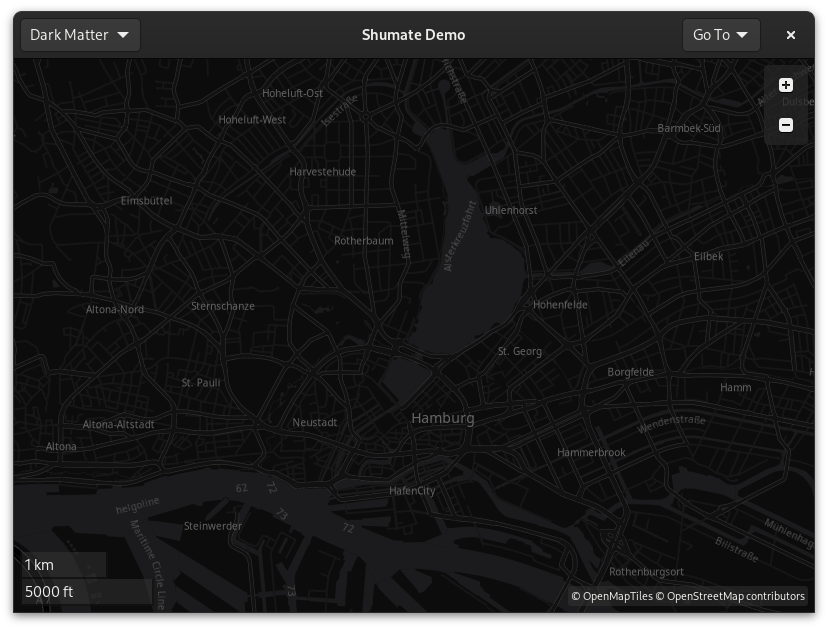
<p>The vector renderer in libshumate uses the <a href="https://maplibre.org/maplibre-style-spec/">MapLibre Style Specification</a> format. MapLibre is a widely-used open source library for rendering maps, so there are plenty of existing styles available for it. However, most of them are designed to be basemaps, ideal for displaying data on top of them. They often use muted colors and don’t show much detail, particularly the dark styles. Our use case is different: as a maps app, the style itself is the main focus of the map. It needs to be clear and easy to read while containing all the information people expect from a street map.</p>

<figure>
<img alt="Dark mode map of Hamburg, Germany" src="/assets/map-style/dark-matter.png" />
<figcaption style="margin-left: 10px">The Dark Matter style has little contrast or detail, but would look great for showcasing data.</figcaption>
</figure>

<p>OSM Liberty, the style that the Experimenal Map mode used in 45, wasn’t bad for this purpose. It has icons for many types of places, it uses color to distinguish different types of roads, and it has the detail we need. But it’s not a perfect fit. It has no dark variant, which is an important part of the GNOME platform. It also doesn’t incorporate some newer techniques like localization, highway layering, or complex text formatting. Sure, we could add those features, but at that point we’re basically making a new style anyway.</p>

<p>Besides, I wanted to make a style that’s unique to Maps, to give it a distinctive identity. It should be something we can tweak and improve over time, that’s designed to be the best possible map for our app.</p>

<h2 id="design-goals">Design Goals</h2>

<p>I started out with a few goals in mind:</p>

<ul>
  <li><strong>Compliance with GNOME’s HIG.</strong> The map style should follow GNOME’s Human Interface Guidelines. This encompasses typography, color scheme, icons, dark mode, accessibility support, and overall design ethos.</li>
  <li><strong>Worldwide usefulness.</strong> The map style should be suitable for use everywhere, not just in a few regions or cultures. For example, a purely car-centric map would be of less use in much of the world.</li>
  <li><strong>Compatibility with libshumate.</strong> There are a few limitations to the vector renderer. In particular, it doesn’t yet support text outlines, so label colors need to be chosen carefully to be readable on any background.</li>
</ul>

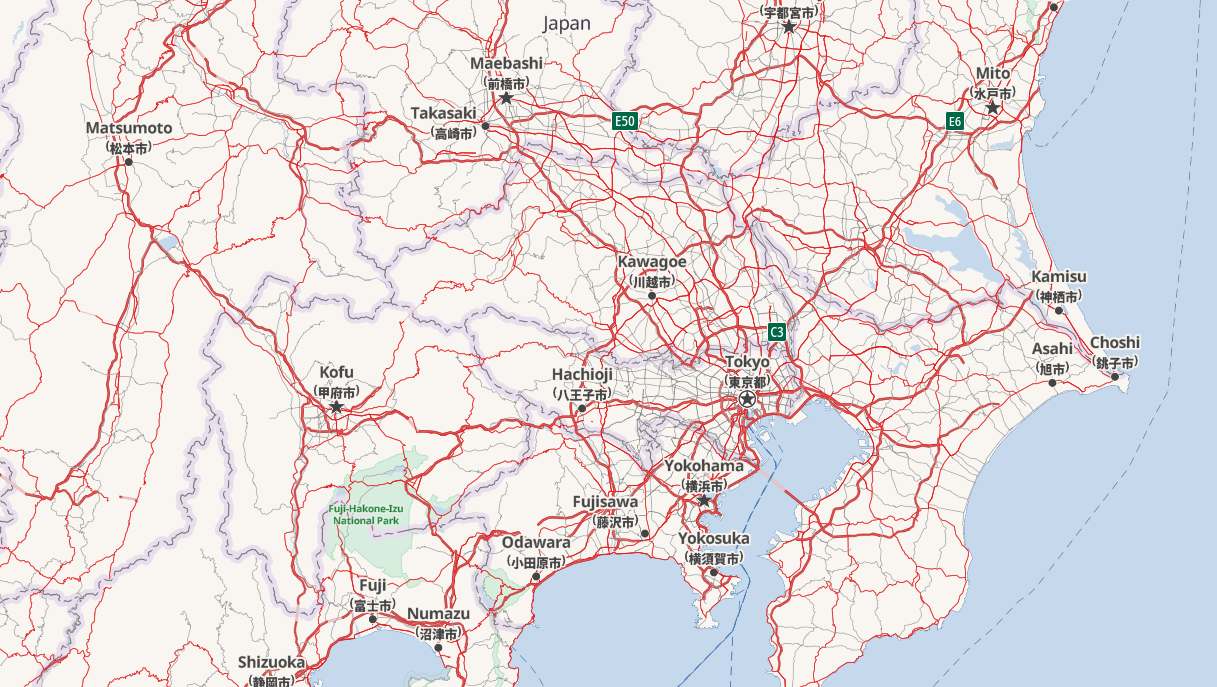
<p>On a technical level, the style was very much inspired by the <a href="https://zelonewolf.github.io/openstreetmap-americana/">OSM Americana</a> project. They have been pushing the limits of what MapLibre can do, and their style is much more than a static basemap. It’s a dynamic, data-driven map that brings relevant information to the forefront with localized names, highway shields, and more. While GNOME Maps looks much different visually, it uses many of the techniques that OSM Americana pioneered.</p>

<figure>
<img alt="A map of Japan in OSM Americana, showing labels in both English and Japanese." src="/assets/map-style/osm-americana-localization.png" />
<figcaption>OSM Americana shows labels in your native language when available. However, if the local name is in a different script, it's shown under the English name.</figcaption>
</figure>

<p>One such technique is simply the use of code generation. Rather than being a static JSON document, like many existing styles are, Americana is generated using JavaScript. This allows for much more complex logic, such as the loops that enable correct highway layering.</p>

<figure>
<picture>
  <source srcset="/assets/map-style/high-five.png" media="(prefers-color-scheme: dark)" />
  <img alt="A map of the High Five Interchange in Dallas, Texas, in the new map style." src="/assets/map-style/high-five-light.png" />
</picture>
<figcaption style="margin-left: 50px; margin-top: -40px;">It's a bit subtle, but notice how the outlines indicate which road passes over the other. This is the <a href="https://en.wikipedia.org/wiki/High_Five_Interchange">High Five Interchange</a>, a 5-level, 12-story-tall monster of a highway interchange in Dallas, Texas.</figcaption>
</figure>

<h2 id="making-the-style">Making the Style</h2>

<p>I started with the high-level features, like water, borders, and place labels. Without those, it’s hard to even navigate the map. I originally used the same color palette we use for app icons, but many people told me it was much too saturated, so I toned it down quite a bit.</p>

<p>Next was roads, which are the most complex part of the style and took a lot of iteration to get right. They need to be the right width at each zoom level, and the colors should clearly indicate the type of road without the color differences being too extreme. Bridges and tunnels should be indicated, and the labels need to be readable no matter the style of the road. And on top of that, there’s pedestrian and cycle paths, which I wanted to be visually distinct without feeling less important than vehicle roads.</p>

<p>Then there’s buildings, which are a bit simpler. They should be a neutral color, but still stand out from the background. I decided to make them visible, though faint, at zoom level 13. It’s not too useful at that zoom level, but it gives otherwise empty areas a bit of texture. And at higher zoom levels, they’re more prominent.</p>

<p>Landcover was tricky because it adds more background colors to the map. It wasn’t hard to make it look good on its own, but it was hard to make it work with the other features without reducing contrast.</p>

<p>Railways were also important to me. Most other maps don’t show them very prominently, but I think it’s valuable to remind people of their transportation options, and railroad tracks can be useful landmarks. While most maps use gray, I gave them a distinctive pink color. And then to continue the transportation theme, Marcus Lundblad added ferry lines and gondolas. So no matter how you’re getting around, hopefully Maps can show you the way!</p>

<p>Points of interest (POIs), like shops and restaurants, were the last major feature. They required some work on the libshumate side, but now we can use symbolic icons from the Adwaita icon library. Many of the icons I needed were already there, and Jakub Steiner from the GNOME design team made a bunch of new ones for us. The lack of text outlines was a bit of a problem when it came to coloring the icons, but I think I found a good balance for contrast.</p>

<h2 id="highway-shields">Highway Shields</h2>

<p>Another awesome feature of OSM Americana is highway shields: the symbols that distinguish different route networks, such as the US Interstate system. Fortunately, most of their work was reusable. I had to port the drawing code to C, but the logic and the SVGs were already there. Thanks again to all the Americana contributors for making this possible!</p>

<figure style="margin-bottom: 1em">
<picture>
    <source srcset="/assets/map-style/highway-shields.png" media="(prefers-color-scheme: dark)" />
    <img alt="A map of part of Interstate 90 in South Dakota, showing the highway shield for I-90." src="/assets/map-style/highway-shields-light.png" />
</picture>
<figcaption>The iconic Interstate shield is a familiar sight to many Americans, and now you can see it on the map too.</figcaption>
</figure>

<figure>
<picture>
    <source srcset="/assets/map-style/highway-shield-india.png" media="(prefers-color-scheme: dark)" />
    <img alt="A map of part of National Highway 65 near Hyderabad, India, showing its yellow and black shield." src="/assets/map-style/highway-shield-india-light.png" />
</picture>
<figcaption>The US isn't the only country with highway shields&mdash;the set includes symbols from all over the world. Here's National Highway 65 near Hyderabad, India.</figcaption>
</figure>

<h2 id="available-in-gnome-46">Available in GNOME 46!</h2>

<p>The new style is available in the “Experimental Map” mode in GNOME 46 or the nightly flatpak. Give it a try and let us know what you think! Now that it’s merged, bugs or feature requests related to the style can be submitted to the <a href="https://gitlab.gnome.org/GNOME/gnome-maps/-/issues">Maps issue tracker</a>.</p>

<figure>
<picture>
    <source srcset="/assets/map-style/experimental-toggle-dark.png" media="(prefers-color-scheme: dark)" />
    <img alt="A screenshot of the layers popover in GNOME Maps, with 'Enable Experimental Map' checked." src="/assets/map-style/experimental-toggle.png" />
</picture>
</figure>

<p>The vector renderer has been three years in the making, so I’m extremely excited to finally see the fruit of all my effort!</p>]]></content><author><name></name></author><summary type="html"><![CDATA[If you follow me on Mastodon, you’ve probably seen plenty of screenshots of the new map style I’ve been working on. Now that it’s been merged (just in time for GNOME 46!), I think it’s time to give it a proper introduction and explain some of the design decisions I made along the way.]]></summary><media:thumbnail xmlns:media="http://search.yahoo.com/mrss/" url="/assets/map-style/thumbnail.png" /><media:content medium="image" url="/assets/map-style/thumbnail.png" xmlns:media="http://search.yahoo.com/mrss/" /></entry><entry><title type="html">Further Adventures in Vector Maps</title><link href="/2023/05/24/further-adventures-in-map-labelling.html" rel="alternate" type="text/html" title="Further Adventures in Vector Maps" /><published>2023-05-24T00:00:00+00:00</published><updated>2023-05-24T00:00:00+00:00</updated><id>/2023/05/24/further-adventures-in-map-labelling</id><content type="html" xml:base="/2023/05/24/further-adventures-in-map-labelling.html"><![CDATA[<p>It’s been almost a year since I last posted about maps, so I figure it’s time for an update! I’ve added a lot of features and fixed a lot of bugs in libshumate’s vector tile renderer.</p>

<h2 id="overzooming">Overzooming</h2>

<p>One of the major benefits of vector tiles is that, unlike raster (image) tiles, we can scale them up without making them blurry. This means that, after a certain zoom level, it’s not really useful to keep splitting the data into smaller and smaller chunks–we can just take a lower zoom level and scale it up.</p>

<p>This has benefits throughout the stack. Offline maps will take a lot less space because we won’t have to store so many different levels of detail. Also, since each zoom level contains four times as many tiles as the one before it, level 18 for the whole world contains over 68 <em>billion</em> tiles! But level 14 contains “only” 268 million. That’s still a whole lot, but it’s small enough that, with a powerful enough computer, we can generate them up front and serve them with <a href="https://github.com/maptiler/tileserver-gl">a much simpler server</a> than raster tiles, which must be generated on demand. The pre-generated tiles are about 80 GB. If you’d like to know more about this process, check out <a href="https://github.com/onthegomap/planetiler">Planetiler</a> or watch out for a future blog post!</p>

<h2 id="symbol-collision">Symbol Collision</h2>

<p>The symbol collision detection that I described in <a href="https://www.jwestman.net/2022/06/18/labelling-maps-is-surprisingly-hard.html">my previous post</a> worked well, but had some drawbacks. Primarily, it wasn’t flexible enough to support all the text layout features I want to implement from <a href="https://maplibre.org/maplibre-gl-js-docs/style-spec/layers/#symbol">the MapLibre spec</a>.</p>

<p>The problem was that the R-tree was built ahead of time and persisted between frames, so it had to contain every symbol in the visible area and every way that each one could rotate or be repositioned. This would have made the code extremely complex if, say, I wanted to add the <code class="language-plaintext highlighter-rouge">text-variable-anchor</code> property, which allows labels to move around to get the best chance of not colliding with another label. How would the R-tree know which placement of the label is the current one?</p>

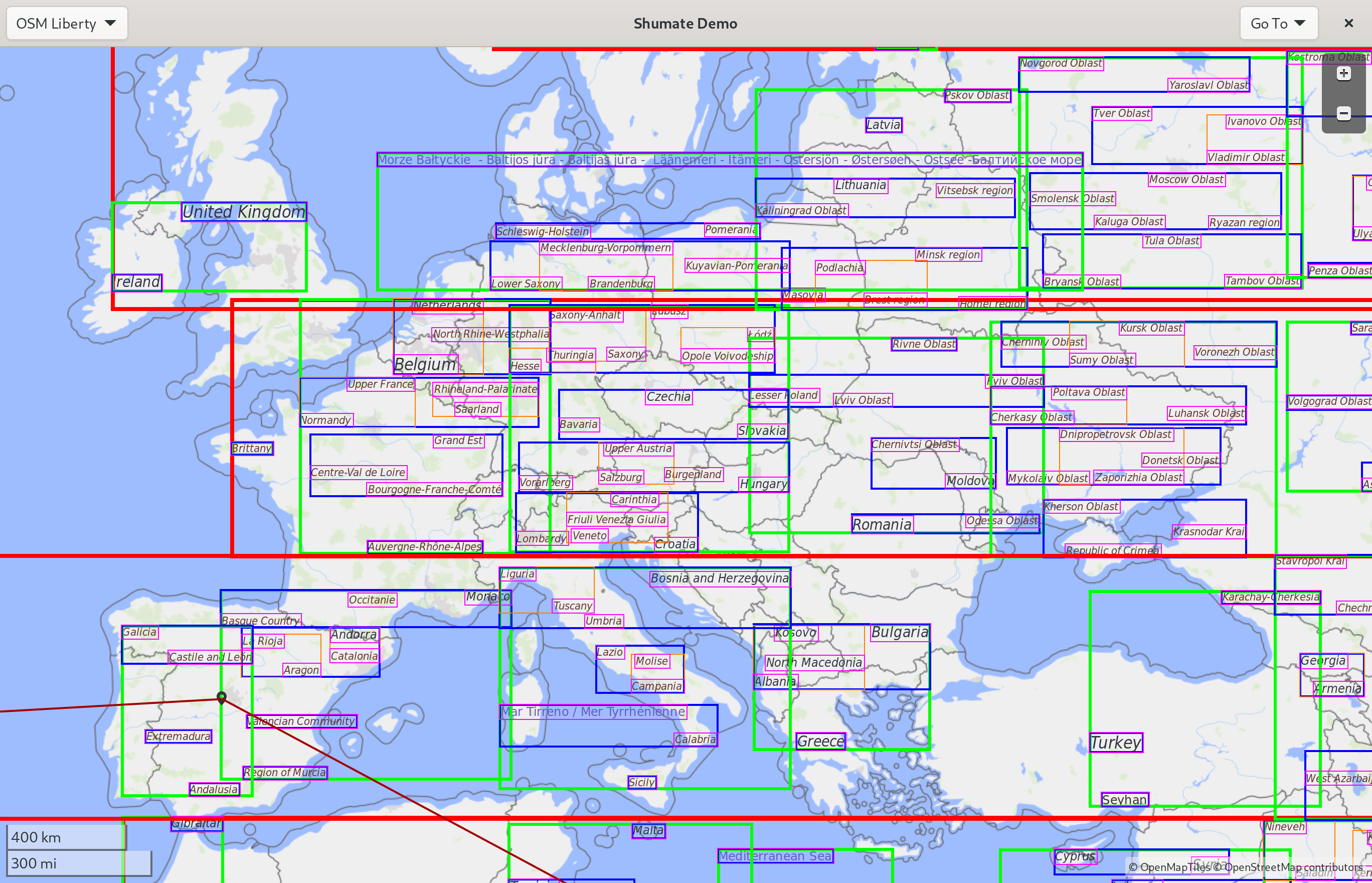
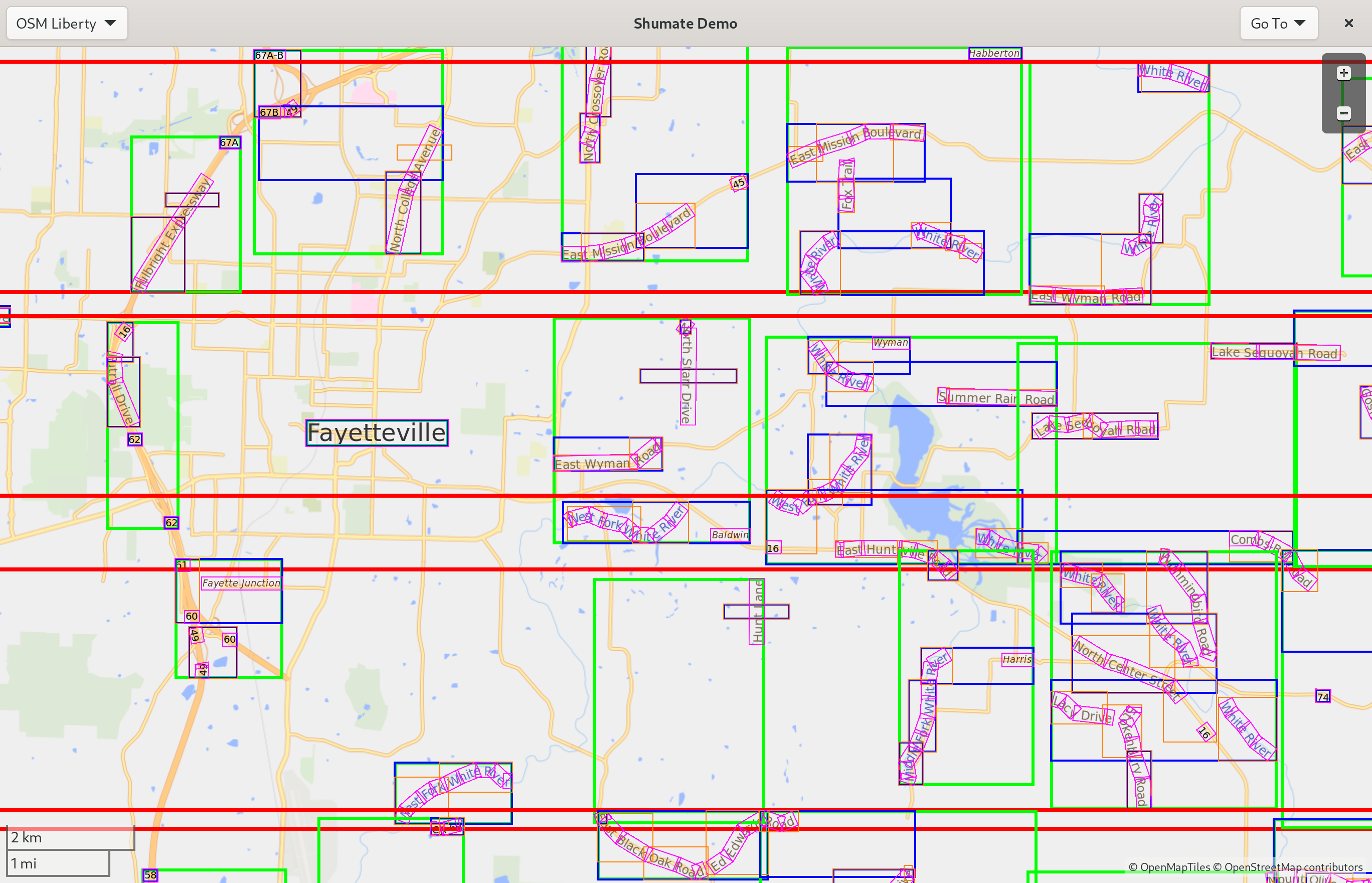
<p>So I changed the R-tree to be re-built every frame. Only rectangles that are currently visible are included in the tree, so the code to check whether a rectangle collides is much simpler. Surprisingly, the new approach actually <em>increases</em> performance, despite constantly rebuilding the tree. Only visible rectangles have to be checked against on each lookup, and the rectangles are smaller because they don’t have to account for every possible rotation of the label, which makes the R-tree method more effective. Here’s the visualization of the new technique:</p>

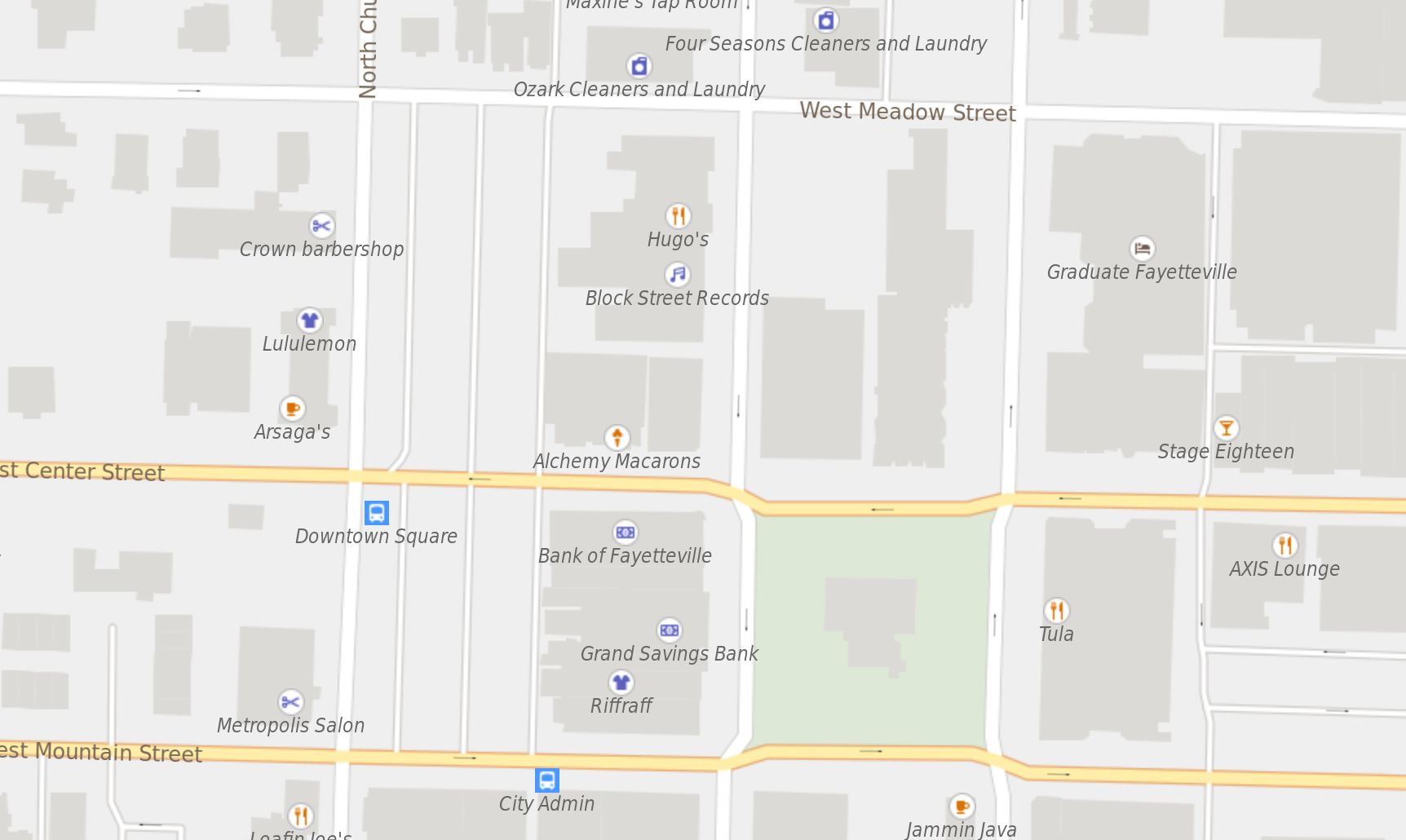
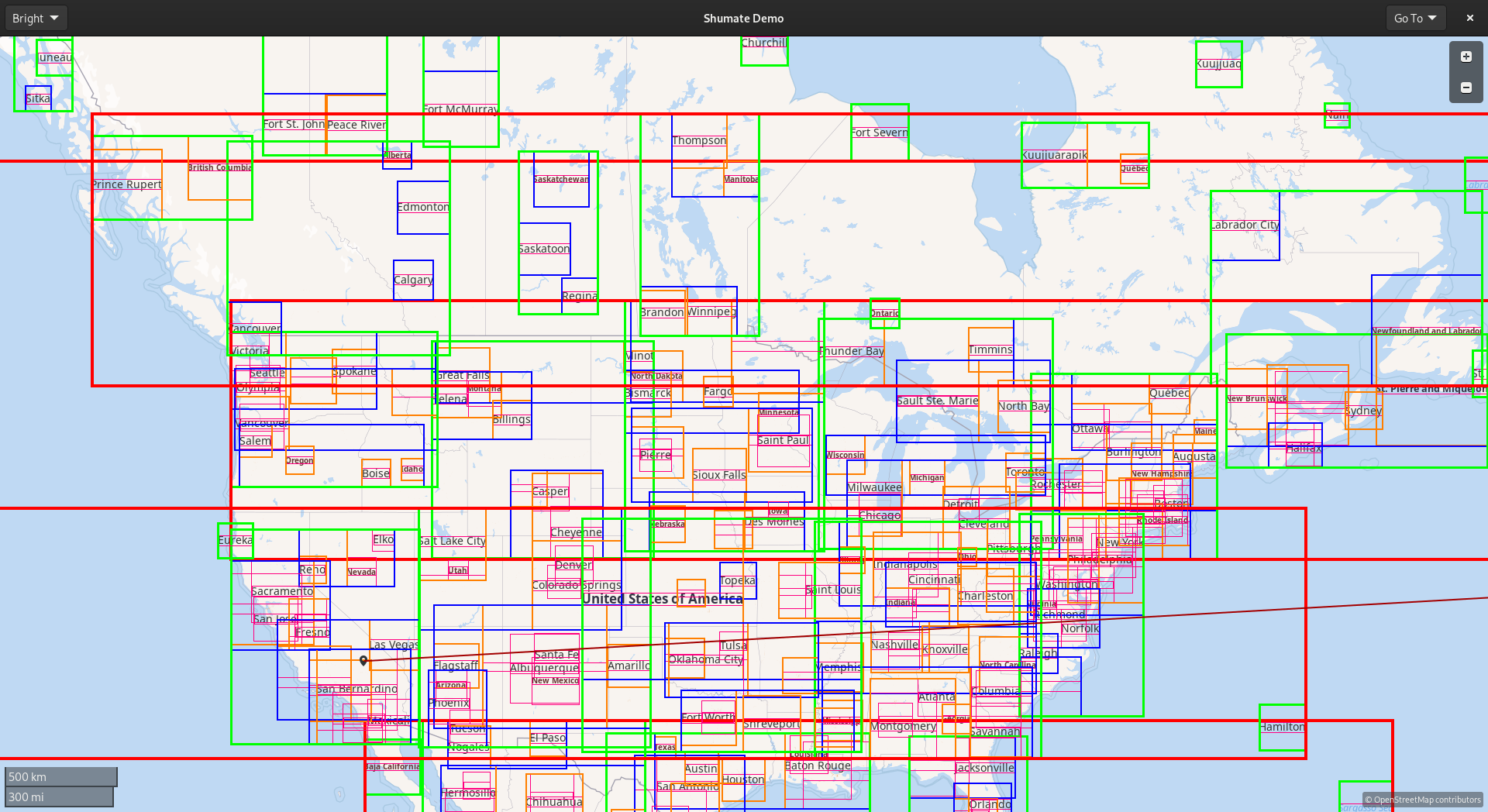
<p><img src="/assets/vector-tiles-3/rtree-europe.png" alt="Visualization of an R-tree. There is a map of Europe cluttered with rectangles nested four layers deep, with each inner rectangle containing a map label." /></p>

<p><img src="/assets/vector-tiles-3/rtree-fayetteville.png" alt="Another visualization of an R-tree. There is a map of Fayetteville, Arkansas cluttered with rectangles nested four layers deep, with each inner rectangle containing a map label (or part of one). Some labels follow the path of rivers, and these have rotated rectangles for each segment of the label." /></p>

<h2 id="icons">Icons</h2>

<p>Following the symbol collision changes, I implemented icons in symbols. This includes both the icons in places’ labels and things like the one-way arrows on streets. It would have been much more complicated to do correctly with the old collision code, but now it works pretty well. Here’s a screenshot:</p>

<p><img src="/assets/vector-tiles-3/map-icons.png" alt="A map of several blocks of a town. There are labels for restaurants, stores, bus stops, etc. with icons above their names." /></p>

<h2 id="expressions">Expressions</h2>

<p>A huge part of the MapLibre spec deals with expressions and data-driven styling. It’s one of the things that make vector tiles so powerful: we can customize the map in new and creative ways without downloading a whole new set of tiles from the server.</p>

<p>Expressions allow style authors to make styling decisions based on the characteristics of individual features, such as giving tunnels a dotted line casing or choosing an icon based on a point of interest’s specific subclass.</p>

<p>The <a href="https://zelonewolf.github.io/openstreetmap-americana">OpenStreetMap Americana project</a> has been pioneering many interesting new uses of expressions. They have support for internationalization, even showing a city’s local name underneath its name in your language if it’s different. They also have highway shields, which are the “icons” that distinguish different route networks, such as the US Interstate system. These use fairly complicated chains of expressions, so to get these features in libshumate I’ll need to implement more of the expressions spec.</p>

<p>I’ve started with the <code class="language-plaintext highlighter-rouge">case</code> and <code class="language-plaintext highlighter-rouge">coalesce</code> expressions, which let us use conditions and create fallback styles, and <code class="language-plaintext highlighter-rouge">let</code> and <code class="language-plaintext highlighter-rouge">var</code>, which make it easier to change style configurations and keep the style organized. I also added some basic string functions like <code class="language-plaintext highlighter-rouge">concat</code> and <code class="language-plaintext highlighter-rouge">downcase</code> as well as mathematical operations.</p>

<h2 id="future-work">Future Work</h2>

<p>I’ve created a <a href="https://gnome.pages.gitlab.gnome.org/libshumate/maplibre-compatibility.html">documentation page</a> cataloging the state of our MapLibre spec implementation. There’s a lot of red X’s at the moment. But many of them, including the most important ones, will be fairly straightforward to implement.</p>

<p>I’ve also made some improvements to performance–including Sysprof integration–but that’s a subject for another blog post. I’ve also started working on a <a href="https://maps.jwestman.net">new map style</a>, which will also get a blog post when it’s a little further along.</p>

<p>But most importantly, the vector renderer is getting to a point where it’s usable with a real style–you might have noticed the screenshots in this post use OSM Liberty instead of the old testing style, and it looks pretty good! So the next step is to get GNOME Maps ready to use the vector styles. It will start as an experimental feature, but the goal is to get it to a point where it can become the default.</p>

<p>Thank you to everyone who’s encouraged my maps obsession over the years, given me feedback on my map style, reviewed my merge requests, and contributed on Sponsors. I’m looking forward to another exciting and hopefully eventful year of map development!</p>]]></content><author><name></name></author><summary type="html"><![CDATA[It's been almost a year since I last posted about maps, so I figure it's time for an update!]]></summary></entry><entry><title type="html">Labelling Maps is Surprisingly Hard</title><link href="/2022/06/18/labelling-maps-is-surprisingly-hard.html" rel="alternate" type="text/html" title="Labelling Maps is Surprisingly Hard" /><published>2022-06-18T00:00:00+00:00</published><updated>2022-06-18T00:00:00+00:00</updated><id>/2022/06/18/labelling-maps-is-surprisingly-hard</id><content type="html" xml:base="/2022/06/18/labelling-maps-is-surprisingly-hard.html"><![CDATA[<style>
    /* Brilliant pure CSS image comparison slider from <https://codeconvey.com/pure-css-image-comparison-slider/> */
    .image-slider {
        position: relative;
        display: inline-block;
        max-width: 100%;
        aspect-ratio: calc(828/629);
        overflow: hidden;
    }

    .image-slider > .container {
        position: absolute;
        top: 0;
        bottom: 0;
        left: 0;
        width: 50%;
        max-width: 100%;
        overflow: hidden;
        resize: horizontal;
    }

    .image-slider > .container:before {
        content: '';
        position: absolute;
        right: 0;
        bottom: 0;
        width: 13px;
        height: calc(1em + 6px + 3px);
        background: white;
        z-index: 100;
    }

    .image-slider > .container > img {
        max-width: unset;
        max-height: 100%;
    }

    .image-slider > .resize {
        position: absolute;
        bottom: 0;
        left: 0;
        right: 0;
        padding: 3px;
        pointer-events: none;
        background: rgba(0,0,0,50%)
    }

    .image-slider img {
        user-select: none;
    }
</style>

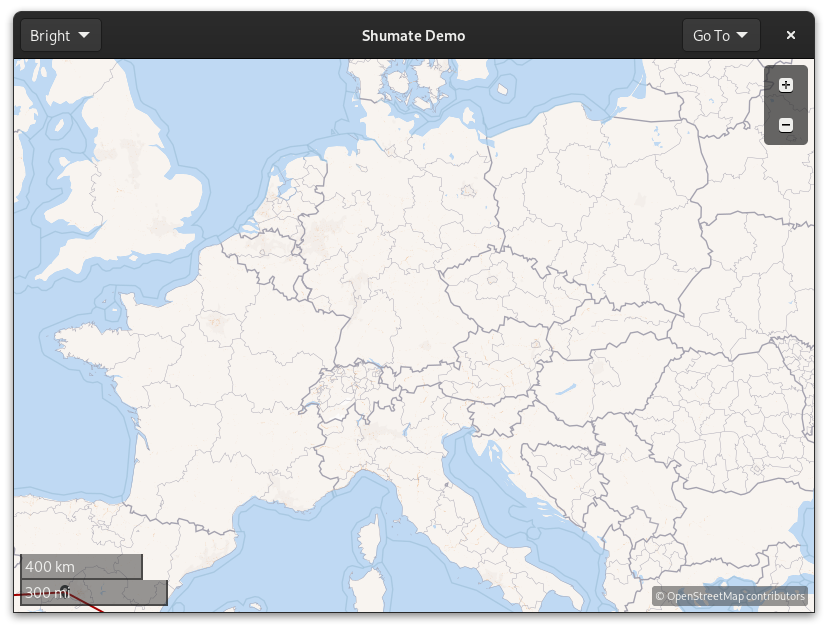
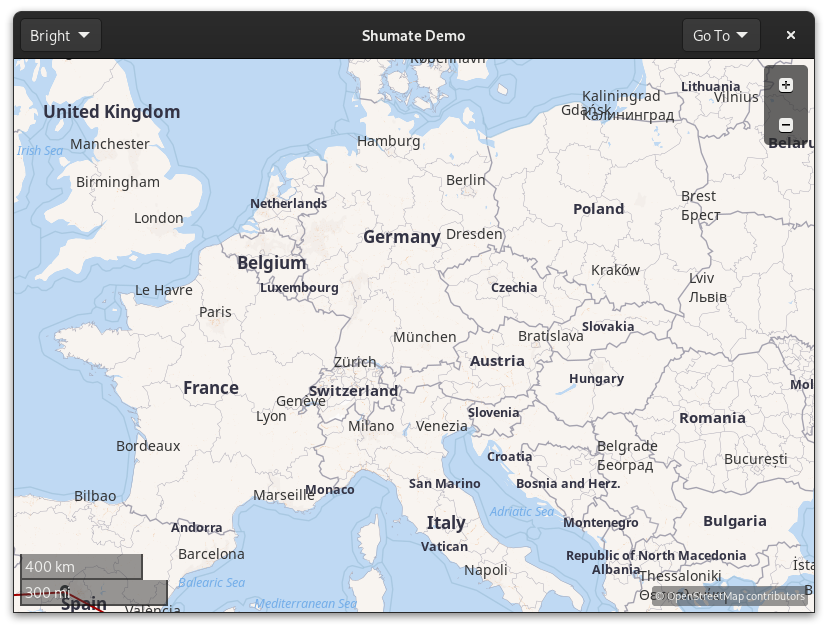
<p>Digital maps are complicated. But they’re not just regular complicated–I like to say
they’re <em>fractally</em> complicated. As in, every interesting problem is actually
composed of several other interesting problems. That’s what makes them so much fun
to work on!</p>

<p>The past few months’ set of interesting problems has been labels. They are
rather important on a map. Compare:</p>

<figure class="no-print">
<div class="image-slider">
<div class="container"><img src="/assets/vector-tiles-2/unlabelled.png" alt="An unlabelled map of Europe" /></div>
<img src="/assets/vector-tiles-2/labelled.png" alt="A labelled map of Europe" />
<div class="resize">Slide to compare</div>
</div>
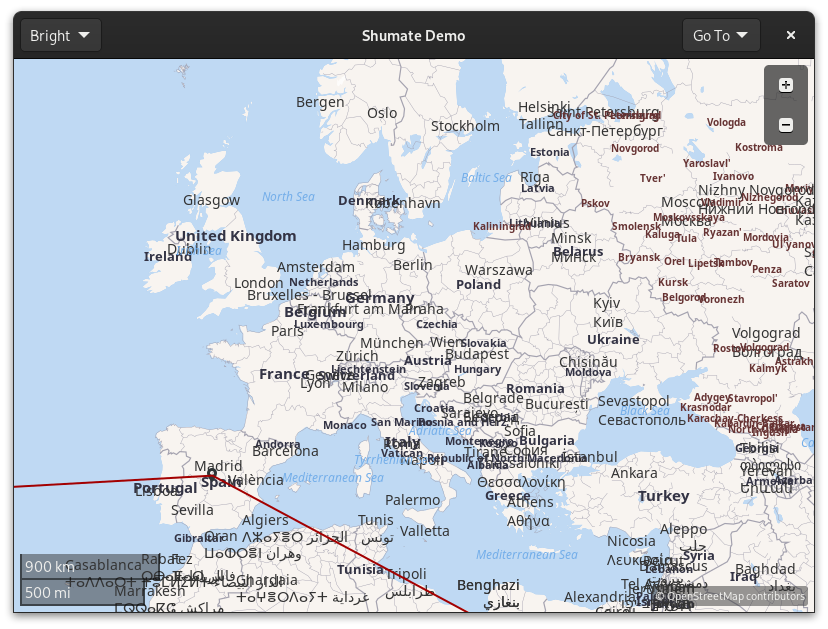
<figcaption>Also in this screenshot, a sneak peek of part 3!</figcaption>
</figure>

<div class="print-only" style="display: flex; flex-direction: row;">
<figure class="print-only">
<img src="/assets/vector-tiles-2/unlabelled.png" alt="An unlabelled map of Europe" />
<figcaption>An unlabelled map of Europe</figcaption>
</figure>
<figure class="print-only">
<img src="/assets/vector-tiles-2/labelled.png" alt="A labelled map of Europe" />
<figcaption>The same map, but with labels</figcaption>
</figure>
</div>

<h2 id="place-labels">Place labels</h2>

<p>The first step was to get labels to appear at all. That was fairly
straightforward, as it just required reading from the vector data and
creating a GtkLabel. It looked like this:</p>

<p><img src="/assets/vector-tiles-2/overlapping-labels.png" alt="A map of Europe with a lot of overlapping labels" /></p>

<p>Yikes. The labels are all on top of each other, and it’s hard to read them. We
need a way to hide some of the labels so that none of them overlap. There are
several approaches that could be taken here, but I decided to go with one of
the simpler ones: an <a href="https://en.wikipedia.org/wiki/R-tree">R-tree</a>.</p>

<h2 id="work-smarter-not-harder">Work smarter, not harder</h2>

<p>The easiest way to solve this problem is to check whether each label overlaps
each other label. Unfortunately, this algorithm would be far too slow–it’s
O(n<sup>2</sup>) because it uses two nested loops over the input. As the input grows
linearly, the amount of time required grows quadratically. Now, sometimes, that’s fine:
if your input is always small, or if CPU time isn’t a concern, it’s not an
issue. But here, we might have a thousand labels on the screen, and the overlap
needs to be recalculated every frame when you’re zooming or rotating. So
quadratic is not going to cut it.</p>

<p>Enter R-trees. Trees are extremely important in computer science because they
allow us to store data recursively and use divide-and-conquer algorithms on
it. In libshumate, the R-tree stores labels in nodes based on their location.
Each node has a bounding box that surrounds all the nodes inside it. That
enables an extremely effective optimization: if two nodes don’t intersect,
none of their children can possibly intersect with each other.</p>

<p><img src="/assets/vector-tiles-2/rtree-visualization.png" alt="Visualization of an R-tree. There is a map cluttered with rectangles nested four layers deep, with each inner rectangle containing a map label." /></p>

<p>Above is a visualization of libshumate’s R-tree. Note how nearby labels are
grouped together into orange nodes, then blue nodes, then green, then red.
When searching for overlap, we can start with the red nodes. If the label in
question doesn’t intersect a given red node, we don’t have to search <em>any</em> of its
children. If it does intersect, we search the green nodes similarly, then
blue, etc. If a label intersects with one that’s already been placed, we hide
it for that frame.</p>

<h2 id="line-labels">Line labels</h2>

<p>The next step was “line labels”–labels that follow a line geometry such as a
river or a street. These were tricky for a whole different reason: text
rendering.</p>

<p>The GNOME platform’s text rendering library is called Pango. It handles all the
complicated parts of converting a <code class="language-plaintext highlighter-rouge">char *</code> into pixels. There’s a general
overview of the steps of this process <a href="https://docs.gtk.org/Pango/pango_rendering.html">in the Pango docs</a>
if you’re interested in learning more.</p>

<p>There are many different “units” of text–bytes, characters, code points, and
glyphs–all of which can be different! For example, the 🇺🇸 United States Flag
emoji consists of two Unicode code points in sequence: 🇺 Regional Indicator Symbol Letter U
and 🇸 Regional Indicator Symbol Letter S. And in the UTF-8 encoding,
those code points take four bytes each.</p>

<p>What libshumate is interested in is glyphs. A glyph is a <em>visual</em> unit of text–
a single image that appears on screen. Libshumate uses Pango to convert a string
of text into glyphs using the given font, then interpolates along the line
geometry to place each glyph individually. The initial result looks like this:</p>

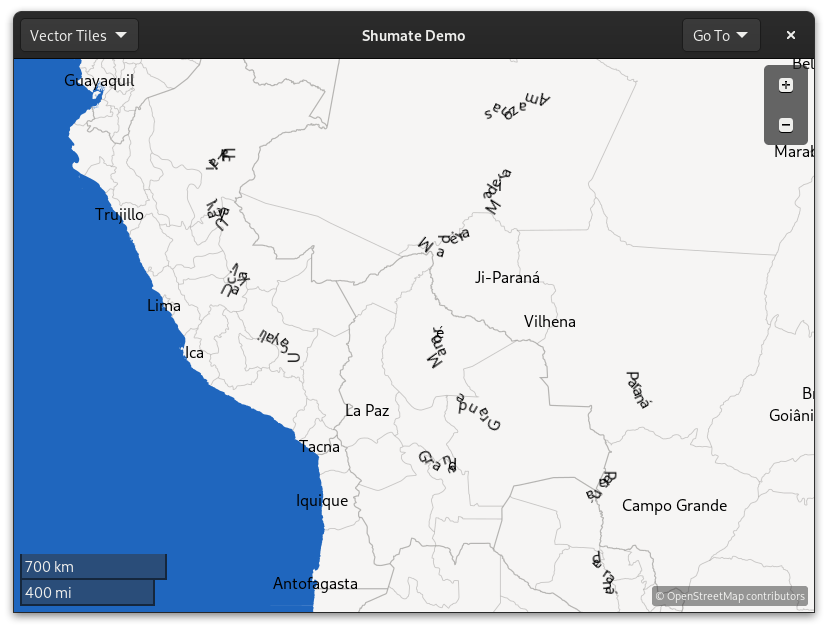
<p><img src="/assets/vector-tiles-2/bad-line-labels.png" alt="Map of part of South America. River labels are illegible because the glyphs overlap so much." /></p>

<p>Yikes again! The river geometry is extremely detailed. This is great for drawing
the river itself, but it causes the glyphs to be drawn all jumbled.</p>

<p>I tried several line simplification algorithms to try to fix the problem. One
popular algorithm is called the <a href="https://en.wikipedia.org/wiki/Visvalingam%E2%80%93Whyatt_algorithm">Visvalingam-Whyatt algorithm</a>,
which deletes points along a line based on the area of the triangles they form
with neighboring points. The idea is to delete points that “don’t matter
much” to the overall shape of the line. However, this technique didn’t work
very well because it left many sharp angles, which still confuse the glyph placement.
The next technique was to average each point with its neighbors, “smudging” the
line smooth. This worked too well, and deformed street labels even if they looked
fine!</p>

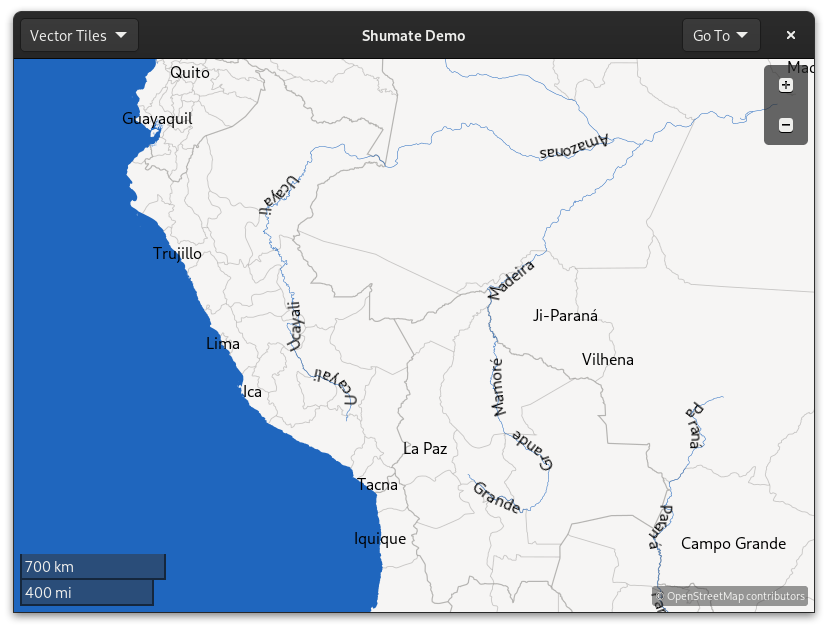
<p>In the end, I went with an algorithm that merges neighboring points if they
are too close to each other. This did the best job of solving the original problem–
too much detail–so the result looks like this:</p>

<p><img src="/assets/vector-tiles-2/smooth-line-labels.png" alt="Map of the same area of South America, but the river labels are legible this time." /></p>

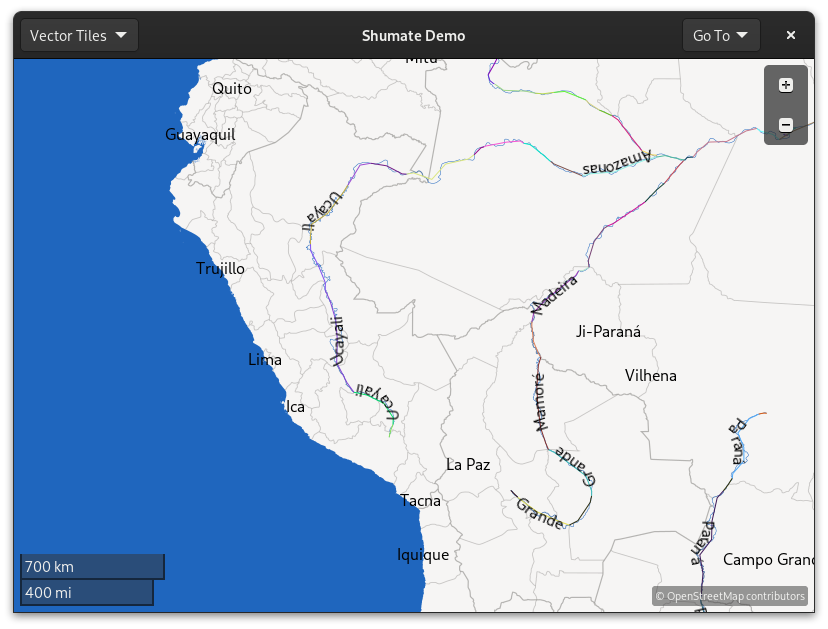
<p>Much better! You can see in this visualization that the lines used to draw labels
skip over the high-detail twists and turns of the original geometry:</p>

<p><img src="/assets/vector-tiles-2/smooth-line-labels-visualization.png" alt="The same map of South America, with multi-colored lines drawn along the rivers" /></p>

<h2 id="future-work">Future Work</h2>

<p>One of the most interesting things we can do with these labels is make them
directly clickable. Right now, in GNOME Maps, you have to right click and
choose “What’s Here?” to get information about a place, but with labels as
widgets, you’ll be able to click on them directly like on other maps. This will
have to wait for the GTK4/libshumate port of Maps, of course, but this work
makes it possible.</p>

<p>Also, labels need icons! They’re important for recognizing different types of
places and for highway shields. I’ve already started working on them, and hopefully it
won’t take four months this time!</p>]]></content><author><name></name></author><summary type="html"><![CDATA[Or, how I got libshumate to show street names and why it took me four months]]></summary></entry><entry><title type="html">If Blockchain Is “Perfectly Secure,” Why Does It Keep Getting Hacked?</title><link href="/2022/04/28/why-does-crypto-keep-getting-hacked.html" rel="alternate" type="text/html" title="If Blockchain Is “Perfectly Secure,” Why Does It Keep Getting Hacked?" /><published>2022-04-28T00:00:00+00:00</published><updated>2022-04-28T00:00:00+00:00</updated><id>/2022/04/28/why-does-crypto-keep-getting-hacked</id><content type="html" xml:base="/2022/04/28/why-does-crypto-keep-getting-hacked.html"><![CDATA[<p>Someone IRL asked me this question recently. I’m sure it’s a common question, so I thought I’d write a quick explainer. If cryptocurrency and other blockchain technology is supposed to be secured by unbreakable cryptography, why does it seem to be getting hacked <a href="https://web3isgoinggreat.com/">every other day</a>? The answer might not be obvious to those not versed in cybersecurity, but it cuts to the core of the problems with cryptocurrency.</p>

<h2 id="securing-your-wallet">Securing Your Wallet</h2>

<p>Cryptocurrency is like a giant warehouse full of <a href="https://duckduckgo.com/?q=clear+locking+donation+box&amp;ia=images&amp;iax=images">locking donation boxes</a>. Anyone can drop money in a donation box, but only someone with the key can take the money out. Crypto wallets are similar. You can spend money from a wallet only if you have that wallet’s key, which is like a password generated for you when the wallet is created.</p>

<p>However, <em>having the wallet’s key</em> is different from <em>being the wallet’s legal owner.</em> If someone steals the key, as far as the technology is concerned, they have full rights to spend its money. So the “unbreakable” security of cryptocurrency all depends on keeping those wallet keys safe. If, say, <a href="https://web3isgoinggreat.com/?id=metamask-credentials-backed-up-to-icloud">they’re backed up to iCloud and someone hacks your account there</a>, or any number of other things happen to them–cybersecurity is really complicated–all the cryptography in the world can’t help you.</p>

<h2 id="is-it-even-your-wallet">Is It Even Your Wallet?</h2>

<p>Making the issue worse is that many people who hold cryptocurrency don’t even have their own wallets. Instead, they hold their currency through an <em>exchange,</em> which is basically a less-regulated version of a bank. The exchange has its own wallets, and they keep their own records–just like a bank–of which customers own what funds. Hopefully, the exchange keeps better track of their wallet keys than most individuals could hope to. However, holding so many people’s funds in their own wallets also makes them a juicy target. Instead of wallets containing one person’s funds, a hacker could steal wallets with <em>thousands</em> of people’s money. If that happens, the exchange probably won’t be able to cover withdrawals and, without FDIC insurance or any other typical legal protections, customers are out of luck.</p>

<h2 id="good-old-fashioned-scams">Good Old-Fashioned Scams</h2>

<p>Some of the “hacks” are really just scams. Nothing is being hacked, everything is working as intended: to steal money from victims and give it to the scammers. Tons of new coins are pump-and-dump schemes, where a cryptocurrency is marketed by its creators so they can sell it to the marks they’re hyping it up to–only to run away with their profit, leaving the abandoned coins to rot, worthless.</p>

<h2 id="ethereum-and-daos">Ethereum and DAOs</h2>

<p>Ethereum is a blockchain that gets even more complicated. With it, you can create decentralized autonomous organizations, or DAOs. Just like a non-profit, members of a DAO can vote on what to do with the organization’s funds. But instead of bylaws, a DAO is governed by code. If bylaws are deeply flawed, a judge can overrule them. But if the DAO code is flawed, there is no recourse. If it allows a hacker to steal all the funds for
themselves, there’s nothing to stop them.</p>

<h2 id="what-is-security">What Is Security?</h2>

<p>In the narrow case of preventing people without a wallet’s key from spending that wallet’s money, yes, cryptocurrency is secure. But that’s not what we want. When we ask for “security,” we want to be assured that our money will not be lost, that malicious people won’t be able to interfere with our lives, and that the products we use will live up to their promises. These are social and legal questions, and technology alone cannot solve them.</p>]]></content><author><name></name></author><summary type="html"><![CDATA[Someone IRL asked me this question recently. I'm sure it's a common question, so I thought I'd write a quick explainer. The answer might not be obvious to those not versed in cybersecurity, but it cuts to the core of the problems with cryptocurrency.]]></summary></entry><entry><title type="html">Next Steps for Blueprint</title><link href="/2022/04/12/next-steps-for-blueprint.html" rel="alternate" type="text/html" title="Next Steps for Blueprint" /><published>2022-04-12T00:00:00+00:00</published><updated>2022-04-12T00:00:00+00:00</updated><id>/2022/04/12/next-steps-for-blueprint</id><content type="html" xml:base="/2022/04/12/next-steps-for-blueprint.html"><![CDATA[<p><a href="https://jwestman.pages.gitlab.gnome.org/blueprint-compiler/">Blueprint</a> is my
markup language for creating GTK user interfaces. Since the
<a href="https://www.jwestman.net/2021/12/02/introducing-blueprint-a-new-way-to-craft-user-interfaces.html">last blog post</a>,
I and several contributors have fixed a number of bugs that have come up and added
several bits of missing syntax. Thanks to everyone who’s contributed by
reporting issues or submitting merge requests!</p>

<p>Now that the basics are done, I’m almost ready to call it 1.0. I still need to
figure out how to integrate it with Meson better, because there are issues in
some cases with the order that things are compiled. There’s also a couple more
features I want to include, and
<a href="https://gitlab.gnome.org/jwestman/blueprint-compiler/-/issues?milestone_title=1.0">I have a milestone to track them in GitLab</a>.</p>

<p>After the official 1.0 release, I have a number of ideas for where to take
Blueprint next.</p>

<h2 id="ide-integration">IDE Integration</h2>

<p>IDE integration has been a goal from the beginning, but there’s more to do still.
I’d like to add a symbol outline, so you can visualize the widget tree and jump
to the right part of a large file. It would also be nice to be able to
control-click an identifier and jump to that object.</p>

<p>I want to improve the in-IDE documentation, especially by adding docs to
keywords when you hover over them. For example, when you hover over <code class="language-plaintext highlighter-rouge">template</code>,
it will give you a refresher on how templates work. Finally, I want to add a
source code formatter. Most languages have these, and many developers and
projects rely on them to help keep code readable.</p>

<p>In addition to the GNOME Builder integration, I have an experimental VS Code
extension that I need to clean up, make production-ready, and publish. Thanks
to the Language Server Protocol, the vast majority of the code is not specific
to any one IDE and actually resides in the compiler, not the extension. Still,
there is some “glue code” and another syntax highlighter to be written.</p>

<h2 id="documentation--tutorials">Documentation &amp; Tutorials</h2>

<p>Right now, Blueprint’s documentation is quite sparse. There’s an overview, a
tutorial on porting existing projects, and a long list of examples presented
mostly without comment.</p>

<p>I’d like to expand the documentation with a complete explanation of what
Blueprint does and how it works. I also want to create walkthrough of how to
create a simple app from scratch using Blueprint, <em>without</em> prior knowledge of
GtkBuilder required. That way, developers wanting to get into GNOME/GTK
programming can start out with Blueprint if they want.</p>

<h2 id="reactive-ui-programming">Reactive UI programming</h2>

<p>I mentioned reactive programming in my <a href="https://www.jwestman.net/2021/12/02/introducing-blueprint-a-new-way-to-craft-user-interfaces.html">last post about Blueprint</a>,
and I want to expand on that idea because I think it’s really powerful.</p>

<h3 id="a-bit-of-theory-and-some-gobject-details">A bit of theory, and some GObject details</h3>

<p>The following is some background on programming language concepts, which I find
interesting; you can skip this section if that doesn’t interest you.</p>

<p>In the <em>declarative programming</em> paradigm, you describe the expected result of a
computation. This is in contrast to <em>imperative</em> programming, where you outline
the exact steps of a computation. For example, a SQL query describes what data
to fetch and how to aggregate it, but leaves the loops and table lookups to
the database to figure out.</p>

<p>Reactive programming is a type of declarative programming where a value can
depend on other values and be updated automatically when they change. In
reactive programming, <code class="language-plaintext highlighter-rouge">a = b + c</code> is not an assignment that executes at a point
in time, but rather an invariant that holds as long as <code class="language-plaintext highlighter-rouge">a</code> exists. When either
<code class="language-plaintext highlighter-rouge">b</code> or <code class="language-plaintext highlighter-rouge">c</code> changes, <code class="language-plaintext highlighter-rouge">a</code> automatically changes to match.</p>

<p>This paradigm is particularly fitting for user interfaces, which usually need
to continually reflect the state of some underlying data model. When the data
changes, the UI always needs to update with it. Have you ever had a giant,
messy <code class="language-plaintext highlighter-rouge">update()</code> method in your UI code that you call whenever the data
changes? That’s the imperative programming solution to a problem that’s
inherently reactive.</p>

<p>Web frameworks have been using more-or-less reactive approaches for a long time.
React (of course), Angular, Vue, and Svelte are well-known examples. Although they
work in different ways, all four use templates to generate an HTML page from
data, then keep the page updated when the data changes. They’ve managed to make
this work, but JavaScript doesn’t always play nice–there are well-known
performance issues with recalculating the DOM tree, and nested data structures
generally don’t trigger updates.</p>

<p>But it turns out GObject has had a critical reactive programming feature
<a href="https://gitlab.gnome.org/GNOME/glib/-/commit/e773d7dba66cf51c7d6ad7d1973ab3635e986e2e">since before I was born</a><sup id="fnref:1"><a href="#fn:1" class="footnote" rel="footnote" role="doc-noteref">1</a></sup>.
It’s the <code class="language-plaintext highlighter-rouge">notify::*</code> signal, which invokes a callback whenever a GObject
property changes.</p>

<p><a href="https://docs.gtk.org/gtk4/class.Expression.html">Gtk.Expression</a> is new in
GTK 4. An expression can be a constant, a property lookup, or a user-defined
function, and expressions can be composed with each other. Expressions can be
watched, so that a callback is invoked whenever any input of the expression
changes. They can also be bound, so that when those inputs change, a property
is updated with the new value of the expression.</p>

<p>You can probably see where reactive programming fits here. Instead of updating
the UI by writing tedious imperative code, you can simply declare expressions
that update it automatically. No more giant <code class="language-plaintext highlighter-rouge">update()</code> methods!</p>

<h3 id="reactive-programming-with-blueprint">Reactive programming with Blueprint</h3>

<p>Here’s how it would work in practice. In your code, you’d define properties
for your data. In the matching blueprint file, you’d reference those properties
using the <code class="language-plaintext highlighter-rouge">bind</code> keyword, which creates a reactive expression.</p>

<p>Some use cases are simple.</p>

<pre><code class="language-blueprint">Spinner {
  visible: bind MainWindow.active-http-request.pending;
}
Label status_code {
  label: bind MainWindow.active-http-request.status;
}
</code></pre>

<p>Some are a little more complex.</p>

<pre><code class="language-blueprint">Label map_scale_label {
  label: bind (string) zoom_level_to_scale_label(viewport.zoom-level);
}
</code></pre>

<p>But with an expanded expression system, you could even do this:</p>

<pre><code class="language-blueprint">/* Works by generating an expression and binding it to main_stack.visible-child */
Stack main_stack {
  if MainWindow.content-list.n_items() == 0 {
    Adw.StatusPage {
      /* ... */
    }
  } else {
    ListView {
      model: bind MainWindow.content-list;
      /* ... */
    }
  }
}
</code></pre>

<h3 id="implementation">Implementation</h3>

<p>The simpler expressions–constants, property lookups, and callbacks–already
exist in GTK and just need matching Blueprint syntax. I’m hoping to implement
them soon.</p>

<p>The more advanced reactive expressions will require a helper library (don’t
worry, blueprint files that don’t use features from the library won’t need to
link to it). Of course, writing a new expression library is a lot more work than
just adding syntax to the compiler, so this is a bit of a “stretch goal”.</p>

<h2 id="making-this-happen">Making this happen</h2>

<p>These plans will likely take well over 100 hours of work to complete. I’m a
college student, so this represents a significant investment of my time.
If you’d like to <a href="https://github.com/sponsors/jameswestman">sponsor</a> this work,
I’d be incredibly grateful! Sponsorships really do help me justify spending
more time on Free Software instead of things that pay by the hour :)</p>

<p>But, sponsorships or not, this is something I’m really excited to work on.
Language design fascinates me, and developer experience is something I think is
really important for any <a href="https://www.jwestman.net/2021/10/26/platforms-compatibility-the-future-of-the-free-desktop.html">platform</a>.
The GNOME ecosystem is great to work with, and the community is creating some
awesome stuff that I’m grateful to be a small part of.</p>

<hr />

<div class="footnotes" role="doc-endnotes">
  <ol>
    <li id="fn:1">
      <p>Sorry<del>not sorry</del> to anyone who feels old now. <a href="#fnref:1" class="reversefootnote" role="doc-backlink">&#8617;</a></p>
    </li>
  </ol>
</div>]]></content><author><name></name></author><summary type="html"><![CDATA[Blueprint is my markup language for creating GTK user interfaces. Since the last blog post, I and several contributors have fixed a number of bugs that have come up and added several bits of missing syntax. Thanks to everyone who’s contributed by reporting issues or submitting merge requests!]]></summary><media:thumbnail xmlns:media="http://search.yahoo.com/mrss/" url="/assets/blueprints/thumbnail.svg" /><media:content medium="image" url="/assets/blueprints/thumbnail.svg" xmlns:media="http://search.yahoo.com/mrss/" /></entry><entry><title type="html">Embedded Maps with ShumateSimpleMap</title><link href="/2022/01/29/embedded-maps-with-shumate-simple-map.html" rel="alternate" type="text/html" title="Embedded Maps with ShumateSimpleMap" /><published>2022-01-29T00:00:00+00:00</published><updated>2022-01-29T00:00:00+00:00</updated><id>/2022/01/29/embedded-maps-with-shumate-simple-map</id><content type="html" xml:base="/2022/01/29/embedded-maps-with-shumate-simple-map.html"><![CDATA[<p>The first alpha release of libshumate is out, and one of the notable new
features is <a href="https://gnome.pages.gitlab.gnome.org/libshumate/class.SimpleMap.html">ShumateSimpleMap</a>.
If you just want to embed a map in your app without thinking too much about
layers, copyright licenses, and viewports, ShumateSimpleMap is what you’re
looking for.</p>

<h2 id="displaying-a-map">Displaying a map</h2>

<p>ShumateSimpleMap is designed to work out of the box with very little code.</p>

<div class="tabs">
  <div class="tabcontent" data-name="Blueprint">
    <pre><code class="language-blueprint">Shumate.SimpleMap map { }
</code></pre>
  </div>
  <div class="tabcontent" data-name="XML">
    <div class="language-xml highlighter-rouge"><div class="highlight"><pre class="highlight"><code><span class="nt">&lt;object</span> <span class="na">class=</span><span class="s">"ShumateSimpleMap"</span> <span class="na">id=</span><span class="s">"map"</span><span class="nt">&gt;&lt;/object&gt;</span>
</code></pre></div>    </div>
  </div>
</div>

<div class="tabs">
  <div class="tabcontent" data-name="Python">
    <div class="language-python highlighter-rouge"><div class="highlight"><pre class="highlight"><code><span class="n">map_source</span> <span class="o">=</span> <span class="n">Shumate</span><span class="p">.</span><span class="n">MapSourceRegistry</span><span class="p">.</span><span class="nf">new_with_defaults</span><span class="p">().</span><span class="nf">get_by_id</span><span class="p">(</span><span class="n">Shumate</span><span class="p">.</span><span class="n">MAP_SOURCE_OSM_MAPNIK</span><span class="p">)</span>
<span class="nb">map</span><span class="p">.</span><span class="nf">set_map_source</span><span class="p">(</span><span class="n">map_source</span><span class="p">)</span>
</code></pre></div>    </div>
  </div>
</div>

<p>This code will get you a map widget with the default OpenStreetMap style. (Keep
in mind that this style is only available for testing, or with permission from
the OSM Foundation to use their tile servers). It also contains all the widgets
you’d expect in an embedded map: zoom buttons, license/copyright information,
and a scale.</p>

<h2 id="adding-a-marker">Adding a Marker</h2>

<p>You can create a marker layer, then add a marker to it:</p>

<div class="tabs">
  <div class="tabcontent" data-name="Blueprint">
    <pre><code class="language-blueprint">Shumate.Marker marker {
  latitude: -48.8767;
  longitude: -123.3933;
  Image {
    icon-name: "view-pin-symbolic";
  }
}
</code></pre>
  </div>
  <div class="tabcontent" data-name="XML">
    <div class="language-xml highlighter-rouge"><div class="highlight"><pre class="highlight"><code><span class="nt">&lt;object</span> <span class="na">class=</span><span class="s">"ShumateMarker"</span> <span class="na">id=</span><span class="s">"marker"</span><span class="nt">&gt;</span>
  <span class="nt">&lt;property</span> <span class="na">name=</span><span class="s">"latitude"</span><span class="nt">&gt;</span>-48.8767<span class="nt">&lt;/property&gt;</span>
  <span class="nt">&lt;property</span> <span class="na">name=</span><span class="s">"longitude"</span><span class="nt">&gt;</span>-123.3933<span class="nt">&lt;/property&gt;</span>
  <span class="nt">&lt;child&gt;</span>
    <span class="nt">&lt;object</span> <span class="na">class=</span><span class="s">"GtkImage"</span><span class="nt">&gt;</span>
      <span class="nt">&lt;property</span> <span class="na">name=</span><span class="s">"icon-name"</span><span class="nt">&gt;</span>view-pin-symbolic<span class="nt">&lt;/property&gt;</span>
    <span class="nt">&lt;/object&gt;</span>
  <span class="nt">&lt;/child&gt;</span>
<span class="nt">&lt;/object&gt;</span>
</code></pre></div>    </div>
  </div>
</div>

<div class="tabs">
  <div class="tabcontent" data-name="Python">
    <div class="language-python highlighter-rouge"><div class="highlight"><pre class="highlight"><code><span class="n">viewport</span> <span class="o">=</span> <span class="nb">map</span><span class="p">.</span><span class="nf">get_viewport</span><span class="p">()</span>
<span class="n">marker_layer</span> <span class="o">=</span> <span class="n">Shumate</span><span class="p">.</span><span class="n">MarkerLayer</span><span class="p">.</span><span class="nf">new</span><span class="p">(</span><span class="n">viewport</span><span class="p">)</span>
<span class="n">marker_layer</span><span class="p">.</span><span class="nf">add_marker</span><span class="p">(</span><span class="n">marker</span><span class="p">)</span>
<span class="nb">map</span><span class="p">.</span><span class="nf">add_overlay_layer</span><span class="p">(</span><span class="n">marker_layer</span><span class="p">)</span>
</code></pre></div>    </div>
  </div>
</div>

<p>Markers aren’t restricted to just icons. They can contain any widget you want,
even containers with multiple children or interactive widgets like buttons.</p>

<h2 id="setting-the-viewport">Setting the Viewport</h2>

<p>The “viewport” refers to the displayed location of the map, its zoom level,
rotation, etc. You can use the <a href="https://gnome.pages.gitlab.gnome.org/libshumate/class.Viewport.html">Shumate.Viewport</a>
methods to change the map’s viewport.</p>

<div class="tabs">
  <div class="tabcontent" data-name="Python">
    <div class="language-python highlighter-rouge"><div class="highlight"><pre class="highlight"><code><span class="n">viewport</span><span class="p">.</span><span class="nf">set_location</span><span class="p">(</span><span class="o">-</span><span class="mf">48.8767</span><span class="p">,</span> <span class="o">-</span><span class="mf">123.3933</span><span class="p">)</span>
<span class="n">viewport</span><span class="p">.</span><span class="nf">set_zoom_level</span><span class="p">(</span><span class="mi">3</span><span class="p">)</span>
</code></pre></div>    </div>
  </div>
</div>

<h2 id="accessing-internal-children">Accessing Internal Children</h2>

<p>ShumateSimpleMap exposes internal children “compass”, “license”, “scale”, and
“map”. You can use this, for example, to add extra license text:</p>

<div class="tabs">
  <div class="tabcontent" data-name="Blueprint">
    <div class="language-plaintext highlighter-rouge"><div class="highlight"><pre class="highlight"><code>Shumate.SimpleMap map {
  [internal-child license]
  Shumate.License {
    extra-text: _("Additional data from Wikipedia");
  }
}
</code></pre></div>    </div>
  </div>
  <div class="tabcontent" data-name="XML">
    <div class="language-xml highlighter-rouge"><div class="highlight"><pre class="highlight"><code><span class="nt">&lt;object</span> <span class="na">class=</span><span class="s">"ShumateSimpleMap"</span> <span class="na">id=</span><span class="s">"map"</span><span class="nt">&gt;</span>
  <span class="nt">&lt;child</span> <span class="na">internal-child=</span><span class="s">"license"</span><span class="nt">&gt;</span>
    <span class="nt">&lt;object</span> <span class="na">class=</span><span class="s">"ShumateLicense"</span><span class="nt">&gt;</span>
      <span class="nt">&lt;property</span> <span class="na">name=</span><span class="s">"extra-text"</span><span class="nt">&gt;</span>Additional data from Wikipedia<span class="nt">&lt;/property&gt;</span>
    <span class="nt">&lt;/object&gt;</span>
  <span class="nt">&lt;/child&gt;</span>
<span class="nt">&lt;/object&gt;</span>
</code></pre></div>    </div>
  </div>
</div>

<p>You can also overlay your own widgets over the map. Just add them as children
of the ShumateSimpleMap, and use the halign and valign properties to position
them (just like a Gtk.Overlay):</p>

<div class="tabs">
  <div class="tabcontent" data-name="Blueprint">
    <div class="language-plaintext highlighter-rouge"><div class="highlight"><pre class="highlight"><code>Shumate.SimpleMap map {
  Gtk.Button {
    label: _("Open in Maps");
    halign: start;
    valign: start;
    margin-start: 6;
    margin-top: 6;
  }
}
</code></pre></div>    </div>
  </div>
  <div class="tabcontent" data-name="XML">
    <div class="language-xml highlighter-rouge"><div class="highlight"><pre class="highlight"><code><span class="nt">&lt;object</span> <span class="na">class=</span><span class="s">"ShumateSimpleMap"</span> <span class="na">id=</span><span class="s">"map"</span><span class="nt">&gt;</span>
  <span class="nt">&lt;child&gt;</span>
    <span class="nt">&lt;object</span> <span class="na">class=</span><span class="s">"GtkButton"</span><span class="nt">&gt;</span>
      <span class="nt">&lt;property</span> <span class="na">name=</span><span class="s">"label"</span><span class="nt">&gt;</span>Open in Maps<span class="nt">&lt;/property&gt;</span>
      <span class="nt">&lt;property</span> <span class="na">name=</span><span class="s">"halign"</span><span class="nt">&gt;</span>start<span class="nt">&lt;/property&gt;</span>
      <span class="nt">&lt;property</span> <span class="na">name=</span><span class="s">"valign"</span><span class="nt">&gt;</span>start<span class="nt">&lt;/property&gt;</span>
      <span class="nt">&lt;property</span> <span class="na">name=</span><span class="s">"margin-start"</span><span class="nt">&gt;</span>6<span class="nt">&lt;/property&gt;</span>
      <span class="nt">&lt;property</span> <span class="na">name=</span><span class="s">"margin-top"</span><span class="nt">&gt;</span>6<span class="nt">&lt;/property&gt;</span>
    <span class="nt">&lt;/object&gt;</span>
  <span class="nt">&lt;/child&gt;</span>
<span class="nt">&lt;/object&gt;</span>
</code></pre></div>    </div>
  </div>
</div>

<script async="" defer="" src="/assets/tabs.js"></script>]]></content><author><name></name></author><summary type="html"><![CDATA[The first alpha release of libshumate is out, and one of the notable new features is ShumateSimpleMap. If you just want to embed a map in your app without thinking too much about layers, copyright licenses, and viewports, ShumateSimpleMap is what you’re looking for.]]></summary></entry><entry><title type="html">Introducing Blueprint: A New Way to Craft User Interfaces</title><link href="/2021/12/02/introducing-blueprint-a-new-way-to-craft-user-interfaces.html" rel="alternate" type="text/html" title="Introducing Blueprint: A New Way to Craft User Interfaces" /><published>2021-12-02T00:00:00+00:00</published><updated>2021-12-02T00:00:00+00:00</updated><id>/2021/12/02/introducing-blueprint-a-new-way-to-craft-user-interfaces</id><content type="html" xml:base="/2021/12/02/introducing-blueprint-a-new-way-to-craft-user-interfaces.html"><![CDATA[<p><a href="/2021/10/22/a-markup-language-for-gtk.html">In a recent blog post</a>, I
presented my latest project, a markup language for creating GTK user interfaces.
I’m excited to announce it’s now ready to use!</p>

<div class="language-plaintext highlighter-rouge"><div class="highlight"><pre class="highlight"><code>using Gtk 4.0;

template MyAppWindow : Gtk.ApplicationWindow {
  title: _("My App Title");

  [titlebar]
  HeaderBar header_bar {}

  Label {
    styles ["heading"]
    label: _("Hello, world!");
  }
}
</code></pre></div></div>

<p><a href="https://jwestman.pages.gitlab.gnome.org/blueprint-compiler/">Blueprint</a> is
a markup language that compiles to GtkBuilder XML. It’s designed to reflect
GTK’s widget model in a straightforward, readable syntax, and is capable of
almost everything GtkBuilder is. The compiler catches many types of errors
early, so you can iterate faster and spend less time debugging.</p>

<p>Switching a project is simple: the compiler runs as part of your build, and
your code stays the same. The interactive porting tool will walk you through
most of the process.</p>

<p>The GNOME Builder plugin is a work in progress, but it provides completion,
docs, diagnostics, and syntax highlighting.
<a href="https://gitlab.gnome.org/jwestman/gnome-builder/-/commits/blueprint-plugin">Here is my Builder branch</a>
if you want to try it out. I’m also working on a VS Code extension, but it’s
not ready yet.</p>

<h2 id="future-plans">Future Plans</h2>

<p>I plan to introduce <a href="https://en.wikipedia.org/wiki/Reactive_programming">reactive programming</a>
to Blueprint using <a href="https://docs.gtk.org/gtk4/class.Expression.html">Gtk.Expression</a>,
a feature that already exists in GTK 4. If you’ve used one of the half-billion
Javascript frameworks out there, you’re probably familiar with reactive programming.
In essence, it syncs your UI (view) with the underlying data (model)
automatically, rather than imperatively updating the UI whenever the data
changes.</p>

<p>To give a concrete example, you’ll be able to write this in your blueprint once:</p>

<div class="language-plaintext highlighter-rouge"><div class="highlight"><pre class="highlight"><code>Label file_size_label {
  label: bind this.item.file-size;
}
</code></pre></div></div>

<p>instead of this in your code <em>every time the file size might have changed</em>:</p>

<div class="language-plaintext highlighter-rouge"><div class="highlight"><pre class="highlight"><code>this.file_size_label.label = this.item.file_size;
</code></pre></div></div>

<p>All you have to do is make <code class="language-plaintext highlighter-rouge">file-size</code> a GObject property (not just a property
or field in your chosen programming language). This is so it gets a <code class="language-plaintext highlighter-rouge">notify</code>
signal.</p>

<p>There’s even more potential to expressions. Arithmetic and boolean operations,
ternary/match statements, and function calls are all on the roadmap. In other areas,
I plan to continue polishing the developer tooling, writing documentation, and
examining how y’all use Blueprint in real apps so I can make it even better.</p>

<h2 id="developer-experience">Developer Experience</h2>

<p>This project is an exercise in developer experience. <a href="/2021/10/26/platforms-compatibility-the-future-of-the-free-desktop.html">I’ve written about Linux
platforms before</a>,
and good developer tooling is a critical part of any platform. Without app
developers, you have no ecosystem. We want to give our developers everything
they need to help our platform grow. Toward that end, I’ve put most of my
effort in Blueprint toward good error checking and a comprehensive language
server.</p>]]></content><author><name></name></author><summary type="html"><![CDATA[In a recent blog post, I presented my latest project, a markup language for creating GTK user interfaces. I’m excited to announce it’s now ready to use!]]></summary><media:thumbnail xmlns:media="http://search.yahoo.com/mrss/" url="/assets/blueprints/thumbnail.svg" /><media:content medium="image" url="/assets/blueprints/thumbnail.svg" xmlns:media="http://search.yahoo.com/mrss/" /></entry><entry><title type="html">Implementing Vector Tile Support in Libshumate</title><link href="/2021/11/08/implementing-vector-tile-support-in-libshumate.html" rel="alternate" type="text/html" title="Implementing Vector Tile Support in Libshumate" /><published>2021-11-08T00:00:00+00:00</published><updated>2021-11-08T00:00:00+00:00</updated><id>/2021/11/08/implementing-vector-tile-support-in-libshumate</id><content type="html" xml:base="/2021/11/08/implementing-vector-tile-support-in-libshumate.html"><![CDATA[<p>It’s incredible how things that seem simple can be so complicated. Take a
“simple” maps app. There’s geometry, design, typography, <a href="https://planet.openstreetmap.org/">a 60-gigabyte database</a>,
and a lot of complicated algorithms. Every button you press has an astonishing
maze of technology supporting it.</p>

<style>
    /* Brilliant pure CSS image comparison slider from <https://codeconvey.com/pure-css-image-comparison-slider/> */
    .image-slider {
        position: relative;
        display: inline-block;
        max-width: 100%;
        aspect-ratio: calc(1349/923);
        overflow: hidden;
    }

    .image-slider > .container {
        position: absolute;
        top: 0;
        bottom: 0;
        left: 0;
        width: 50%;
        max-width: 100%;
        overflow: hidden;
        resize: horizontal;
    }

    .image-slider > .container:before {
        content: '';
        position: absolute;
        right: 0;
        bottom: 0;
        width: 13px;
        height: calc(1em + 6px + 3px);
        background: white;
        z-index: 100;
    }

    .image-slider > .container > img {
        max-width: unset;
        max-height: 100%;
    }

    .image-slider > .resize {
        position: absolute;
        bottom: 0;
        left: 0;
        right: 0;
        padding: 3px;
        pointer-events: none;
        background: rgba(0,0,0,50%)
    }

    .image-slider img {
        user-select: none;
    }
</style>

<p>That’s probably why GNOME Maps fascinates me so much, and why I’ve been
contributing to it for three years now. And it’s why I’m thrilled to announce
something I’ve been dreaming of for those three years, and working on for the
past 8 months: <strong>A vector tile renderer for libshumate</strong>, the library that will
eventually be powering Maps.</p>

<picture>
  
  <source srcset="/assets/vector-tiles/vector-part-1.png.dark" media="(prefers-color-scheme: dark)" />
  <img alt="A demo showing a world map with continents and borders" src="/assets/vector-tiles/vector-part-1.png" />
</picture>

<h2 id="what-are-vectors-tiles-and-vector-tiles">What are vectors, tiles, and vector tiles?</h2>

<p>Maps currently uses <strong>raster tiles.</strong> The map is stitched together from static,
unmodifiable photos downloaded from the map provider. <strong>Vector tiles</strong> contain
the actual map data: what area the park covers, what the name of the café is.
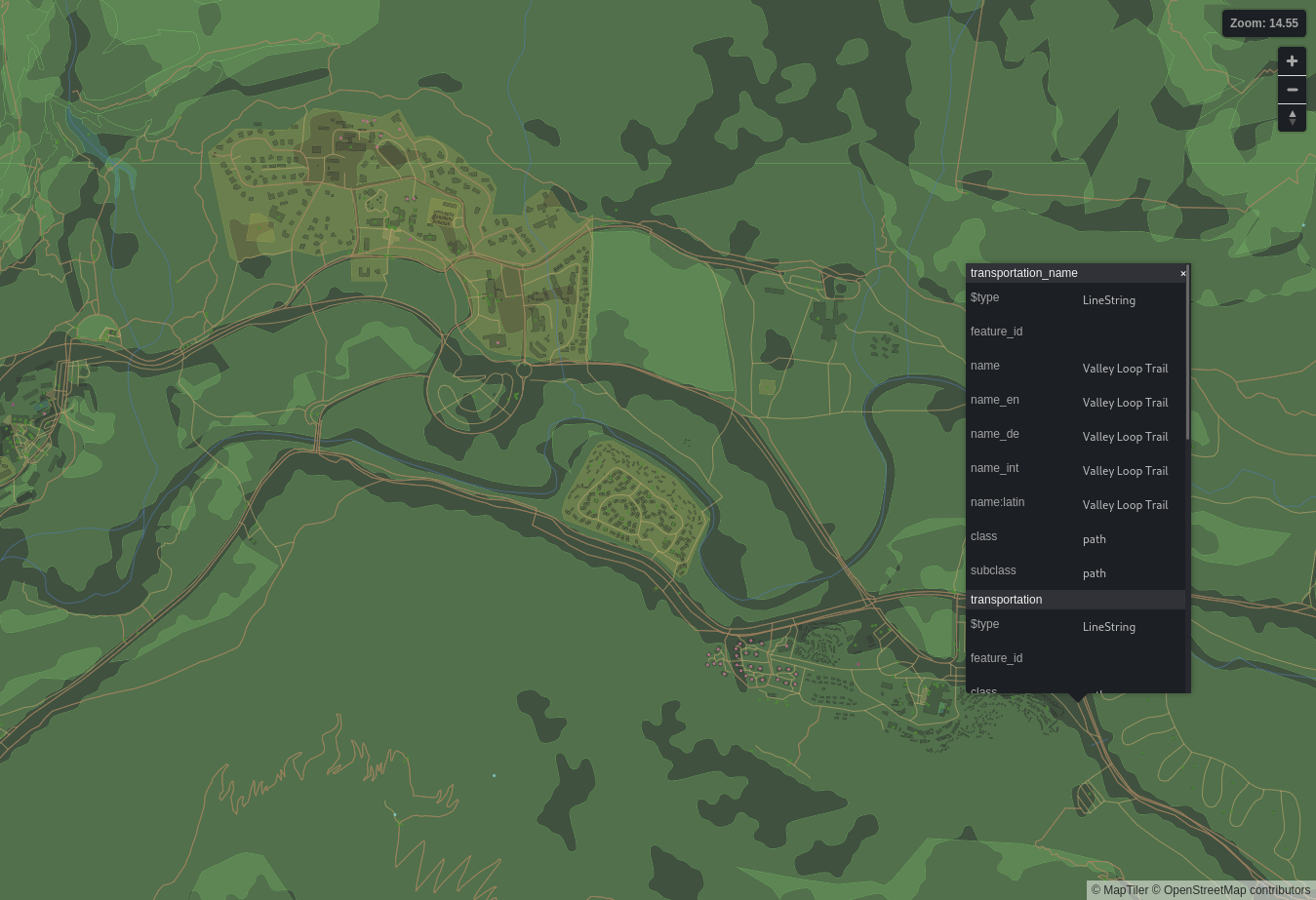
They contain geometry, not pixels, hence <em>vector</em> tiles.</p>

<p>Because raster tiles contain pixels, they’re ready-made to display on screen.
Vector tiles don’t contain pixels, so they need to be converted. This process is
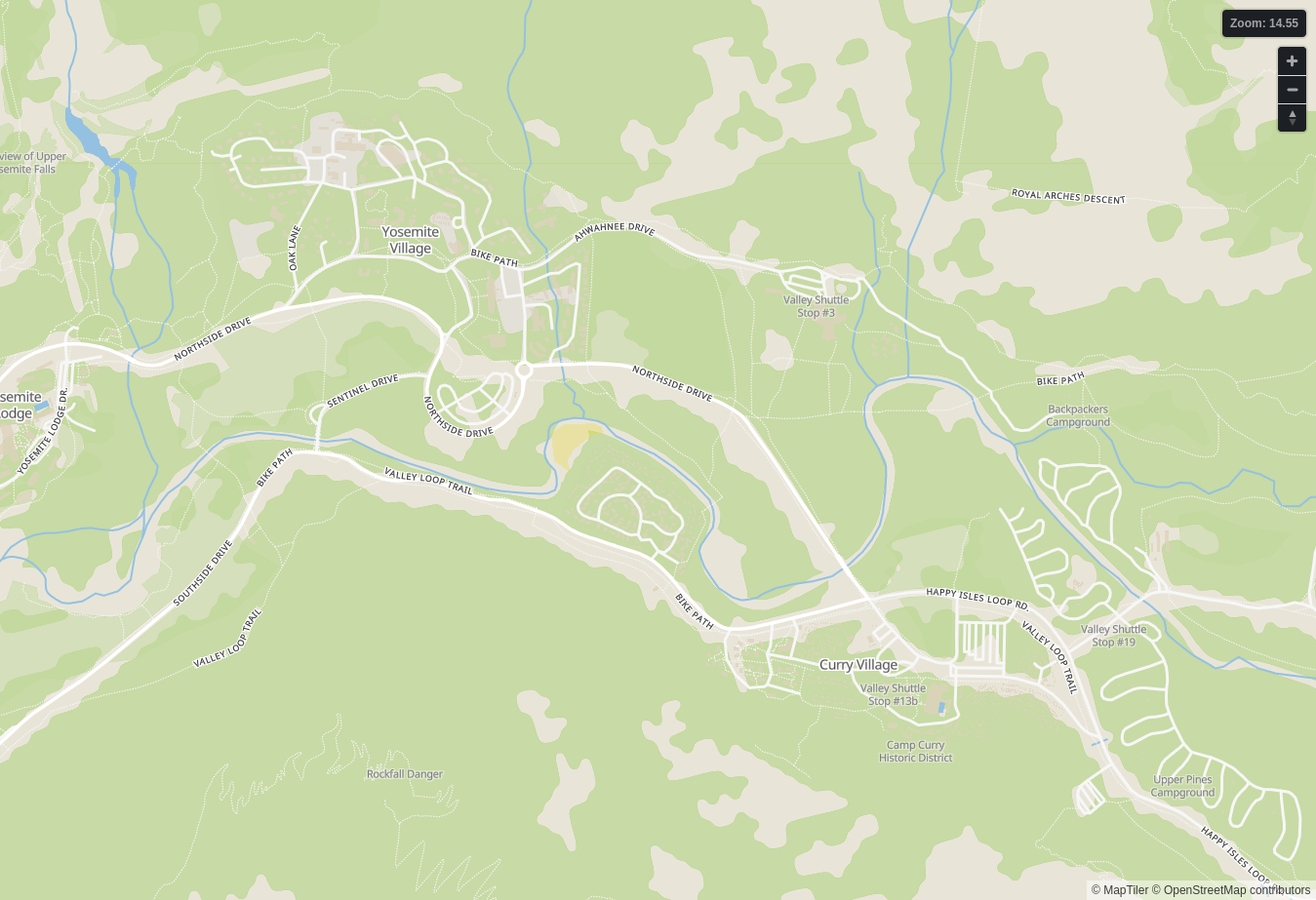
called <em>rendering.</em> The advantage of doing our own rendering is that we can
control what the map looks like: change the colors, choose which language we
want, and decide what places to show or hide. The disadvantage is that rendering
is complicated–it’s taken me 8 months and 3 different prototypes to get it
just right!</p>

<figure>
<div class="image-slider">
<div class="container"><img src="/assets/vector-tiles/vector-rendered.png" alt="A map of Yosemite Village, Yosemite, California" /></div>
<img src="/assets/vector-tiles/vector-data.png" alt="Vector data of the same area, with details about Valley Loop Trail highlighted" />
<div class="resize no-print">Slide to compare</div>
</div>
<figcaption>A rendered map (left) and a visualization of the underlying vector data (right). Screenshots of <a href="https://maputnik.github.io/">Maputnik</a>.</figcaption>
</figure>

<p>Not everything is implemented yet. I still need to support labels, icons, and
higher zoom levels, then spend some time polishing and testing.</p>

<h2 id="what-does-this-mean-for-maps">What does this mean for Maps?</h2>

<p>Not much in the short term–libshumate won’t be ready for another release or
two. Not only are we adding a bunch of features, we’re also redesigning some of
the API and porting to GTK 4.</p>

<p>But when it’s finally finished, we’ll be able to support a number of
oft-requested features:</p>

<ul>
  <li>Showing place names in your native language, where avaliable</li>
  <li>Downloading maps for offline use (technically this could be implemented now,
but raster tiles are too large for it to be practical)</li>
  <li>Rotating the map without rotating the labels with it</li>
  <li>Smooth zooming without pixelation</li>
  <li>Getting rid of “What’s Here?” in the right-click menu. You’ll just click (or
tap) a place instead.</li>
</ul>

<p>Some of these features will work out of the box, and some will need additional
work, but I hope to eventually implement all of them.</p>

<h2 id="stay-tuned">Stay tuned!</h2>

<p>There’s lots more work to do to get libshumate and the vector renderer ready.
I’m a student and I have a part-time job, so no promises on the timeline, but I
hope to have another update in the coming months with lots of exciting
progress!</p>]]></content><author><name></name></author><summary type="html"><![CDATA[It’s incredible how things that seem simple can be so complicated. Take a “simple” maps app. There’s geometry, design, typography, a 60-gigabyte database, and a lot of complicated algorithms. Every button you press has an astonishing maze of technology supporting it.]]></summary><media:thumbnail xmlns:media="http://search.yahoo.com/mrss/" url="/assets/vector-tiles/p1-thumbnail.png" /><media:content medium="image" url="/assets/vector-tiles/p1-thumbnail.png" xmlns:media="http://search.yahoo.com/mrss/" /></entry><entry><title type="html">Platforms, Compatibility, and the Future of the Free Desktop</title><link href="/2021/10/26/platforms-compatibility-the-future-of-the-free-desktop.html" rel="alternate" type="text/html" title="Platforms, Compatibility, and the Future of the Free Desktop" /><published>2021-10-26T00:00:00+00:00</published><updated>2021-10-26T00:00:00+00:00</updated><id>/2021/10/26/platforms-compatibility-the-future-of-the-free-desktop</id><content type="html" xml:base="/2021/10/26/platforms-compatibility-the-future-of-the-free-desktop.html"><![CDATA[<p>If you’ve followed Linux (and particularly GNOME) development, you’ve probably
heard the recent <em>kind, well-meaning, respectful discussions</em> about theming,
extensions, customization, and the general direction of the Linux platform.
Here’s my two cents as a GNOME developer.</p>

<h1 id="linux-is-not-a-platform">“Linux Is Not A Platform”</h1>

<p>This is the general sentiment I hear from developers. But “Linux is not a
platform” is a very vague statement. What is a platform? What is Linux?</p>

<p>The clearest example of a platform is iOS. Par for Apple, it’s tightly
controlled and managed–not something we’d ever want, but helpful for
extrapolating a definition.
iOS as a platform consists of many things. It’s a set of libraries, system
services, toolchains, and hardware. But it has less tangible components, too: APIs,
best practices, Human Interface Guidelines, and even user expectations are all
part of the iOS platform.</p>

<p>If that’s what makes up a platform, what do we have in the Linux world that
compares? Is it the kernel? Certainly not, because Android and ChromeOS both use
the Linux kernel, and I don’t know anyone who would call them part of “our platform,”
whatever that may be. Is it systemd? Many distros don’t use it, and as much as it’s
derided for bloat, it doesn’t provide nearly everything a platform needs to provide.
freedesktop.org? It includes a lot of API standards, but again, not all the
libraries needed to build an app.</p>

<p>So maybe the platform is your DE? Or a combination of these things?</p>

<p>There <em>is</em> something in the Linux world that is unmistakably a platform:
elementaryOS. It has its own libraries and its own system services. It has APIs,
a HIG, and a community of users who have expectations for how their apps work.
Even though many of elementaryOS’s components are third-party–like the kernel,
low-level software, flatpak, and GTK–they’re still packaged and officially endorsed
by elementary as part of the platform.</p>

<p>Developers like platforms. Having a somewhat predictable environment allows us
to focus our limited time on writing the meat of our apps, not debugging arcane
“works on my machine” errors. Users like platforms, too: consistency is key to
user-friendly UX, and we all love to deride Windows and its half-dozen design
languages. For less technical users, it gives a concrete identity to their
computer system that they can learn and reason about.</p>

<p>In light of all this, GNOME developers want to move away from being “just” a
desktop environment, one interchangeable component of a super-modular system.
We want GNOME to become a mature, cohesive, defined <em>platform</em> that developers
can target and users can learn.</p>

<p>Humans generally hate change. We are all too often unable to lay down what’s
good to find what’s best. So I’m not at all surprised that many people
(including, maybe, you) are hesitant or hostile to these changes. Maybe your
concerns are well-founded, which is good: that means they can be addressed!</p>

<p>The main concern I see, and a very valid one (but, I hope to show, misplaced),
is that we’re fragmenting our already tiny market share.</p>

<h1 id="the-problem-of-fragmentation">The Problem of Fragmentation</h1>

<p>If we all spend our resources on different platforms, it means less for everyone,
is the reasoning. Wouldn’t it be wiser if we all collaborated on one Linux
platform? We could spend all our collective effort making one project the best
it could be! There are several problems with this. Most obviously, good
luck getting everyone to work together! We have different goals, plans, and
resources that are <em>not</em> always better served by working together.</p>

<p>But the premise is flawed in the first place: “If we all spend our resources on
different platforms, it means less for everyone.” This is not necessarily true,
even if the dominant proprietary platforms would have you believe it.</p>

<p>Meaningful compatibility is anathema to proprietary platforms. It’s a bulldozer
to the garden walls that they so carefully set up around their ecosystems.
Sure, there’s a few shared components and some standards for important or
low-level stuff, but nothing core to the user experience. Nothing that would be
easy enough to swap out for, <em>gasp,</em> their competitor.</p>

<p>I’m not surprised that people think “different platforms” == “incompatible”.
It’s so well ingrained in tech culture that, it seems, even us Free Software
folks sometimes think it. We had better not fall for that trap. What
Microsoft, Apple, and Google consider a weakness is Free Software’s greatest
strength.</p>

<h1 id="the-solution-of-compatibility">The Solution of Compatibility</h1>

<p>Collaboration is central in the history of Linux and Free Software; in fact,
I’d go so far as to say it’s <em>the</em> fundamental strength of our way of producing
software. From the very beginning, it’s been about sharing code and inviting
everyone to participate in the development process.</p>

<p>Collaboration has a huge impact on the resulting software. Because the different
Linux platforms collaborate on standards, apps written for one platform usually
work just fine on another. Imagine if Microsoft pre-installed Apple’s Mac App
Store on Windows, and all the apps worked right out of the box! How preposterous!
But that’s exactly what we have on Linux, and it’s not going anywhere, no matter
how many new platforms we invent.</p>

<p>In fact, cross-platform compatibility is only getting better, and if I may be so
bold, I think the clear distinction between platforms is <em>driving</em> these
improvements. For example, Flatpak, love it or hate it, is an easy way to
install any app on any platform. It works because we <em>have</em> a notion of a
“platform” and because Flatpak runs an app in its native platform runtime,
rather than the system’s native platform. Because apps don’t have to juggle
a dozen different platforms, they can excel at just one.</p>

<p>Sure, the app may no longer look “native,” but is that really a priority? It
won’t act native anyway–platforms have deeply embedded design patterns and
expectations, and fulfilling them all would amount to writing a separate app.
I think it’s okay for GNOME apps to look like GNOME apps and for KDE apps to
look like KDE apps. By letting apps use their own platform, we’re sacrificing
surface-level consistency for a deeper and more meaningful compatibility.</p>

<p>Of course, compatibility only works when we can agree on things.</p>

<h1 id="we-have-standards">We Have Standards!</h1>

<p>The only reason an elementaryOS app can run on GNOME unmodified is
the freedesktop.org standards. This is where the major platforms agree on
how apps should be able to list themselves in the launcher; open a native file
chooser; show a notification; and a very long list of other important things.</p>

<p>Recently, the list grew a little bit: support for a global dark mode preference
was added. elementaryOS and GNOME both support or will soon support it, and
the possibility is there for other desktops to do so as well. One switch will
work reliably for apps across any standards-compliant platform. This is a great
example of collaboration, and hopefully we’ll see much more of it in the
future.</p>

<p>By relying on these APIs, apps <em>don’t have to care</em> what the underlying platform
is. They only have to care that it complies with standards. This is the great
simplifying power of standardization: Many apps, many platforms, one standard in
between. And those “many apps” and “many platforms” bring me to my final point,
and it’s about every Linux power user’s favorite word: choice.</p>

<h1 id="sources-of-choice">Sources of Choice</h1>

<p>Some choices are meaningful and some are not. <em>Technically,</em> I have a choice
whether I want to go to school every day. The consequence if I don’t is that
I probably fail and lose my scholarship, so it’s not <em>really</em> a choice. The
same is true with technology. A macOS user <em>could</em> choose to switch to Windows
if they thought it suited them better, but that would involve finding new
software to replace the Mac-only apps they used to use and converting all their
files to the new formats. It can be done, but it’s in Apple’s best interest that
you never feel like it’s worth the effort.</p>

<p>Such “technically choices” are completely meaningless. In the Linux world, we
want to offer people real choices, and that doesn’t always mean configuring and
theming and tweaking every detail. <em>Sometimes</em> it does. Sometimes it means <em>not</em>
doing that. It depends on the person. And we offer that choice, too: the choice
of which Linux platform you use in the first place.</p>

<p>But unlike proprietary platforms, when we offer that choice, it’s a meaningful
one. You can switch with minimal disruption. All your apps will still be there
and all your file formats will still be recognized. We aren’t trying to build a
wall around our garden, but offer you different paths through it.</p>

<p>The truth is, Linux is already split among many diverse platforms. The sooner
we accept this truth, the sooner we can carry it to its full potential.</p>]]></content><author><name></name></author><summary type="html"><![CDATA[If you’ve followed Linux (and particularly GNOME) development, you’ve probably heard the recent kind, well-meaning, respectful discussions about theming, extensions, customization, and the general direction of the Linux platform. Here’s my two cents as a GNOME developer.]]></summary></entry></feed>